Korion Health
A B2C Web product providing at-home electronic stethoscopes.
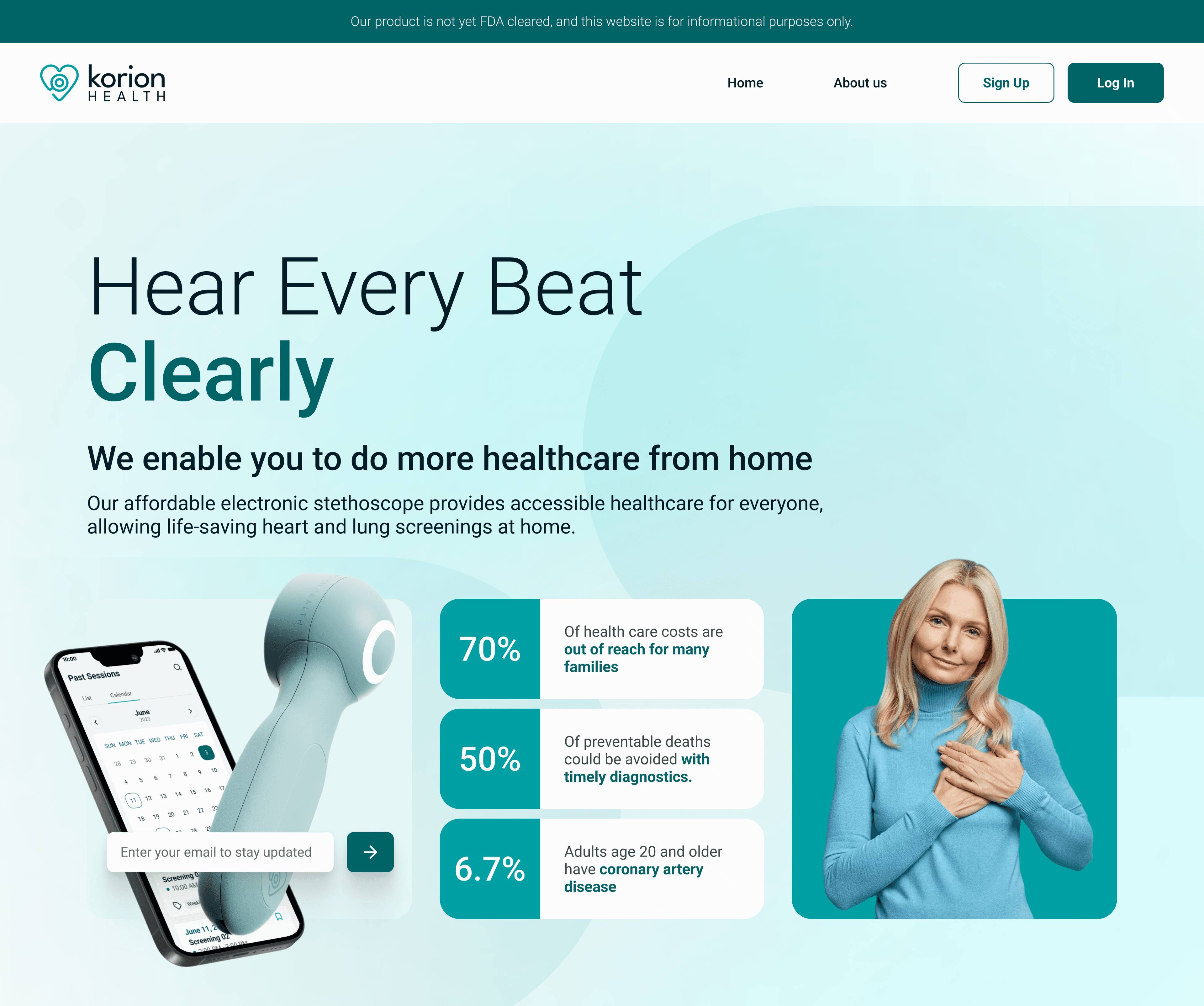
BusyOtter website design showcasing the product
Overview
Korion Health specializes in providing guided, at-home electronic stethoscopes, aiming to make early detection of heart and lung conditions more accessible. By bridging the gap between traditional healthcare barriers and patient needs, Korion Health empowers users to conduct remote health recordings, supporting timely diagnosis and treatment from the comfort of their homes.
The Challenge
Korion Health's landing page was cluttered and outdated, with poorly organized information that made navigation difficult and led to low user engagement. Additionally, the site was not responsive, causing issues for tablet and mobile users. The challenge was to design a page that aligned with the existing system, enhanced navigation and met the needs of both users and stakeholders for inclusivity and consistency.
The Solution
Korion Health strives to improve healthcare accessibility through technology, delivering an efficient, patient-centered experience. Our project focused on creating a clean, modern landing page and intuitive recording session screens to ensure the platform is both visually appealing and functional. We also redesigned the interface to simplify the process of accurately positioning the stethoscope and making recordings. The project spans all platforms, including desktop, tablet, and mobile.
Role
UI/UX Designer
Tools
- Figma (Design)
- Google Meets & Loom (Team Collaboration)
- Monday & Slack (Project Management)
Process
- Discovery
- Sprint 1
- Sprint 2
- Delivery
- Reflection
Kickoff Meeting
During our kickoff meeting, we reviewed client materials including existing design mockups and style guide, client questionnaires to gain a thorough understanding of Korion's brand, product, and key features.
We aligned our objectives with Korion's mission to enhance healthcare accessibility and discussed the project's expectations, which included designing the landing page, refining the user recording process, and creating the recording session screens. This alignment ensured that our goals were in sync with Korion Health's vision and purpose.
UX Research
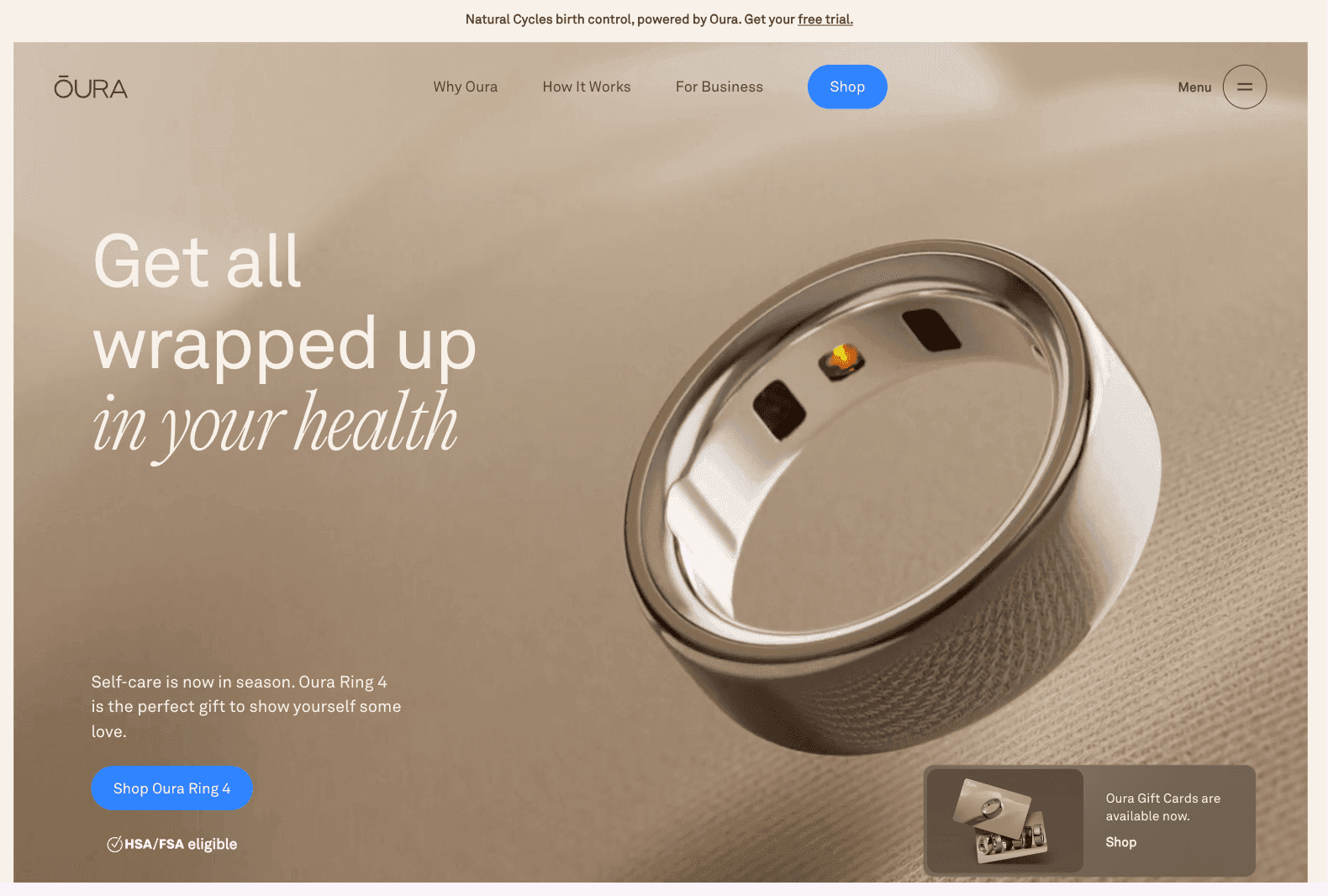
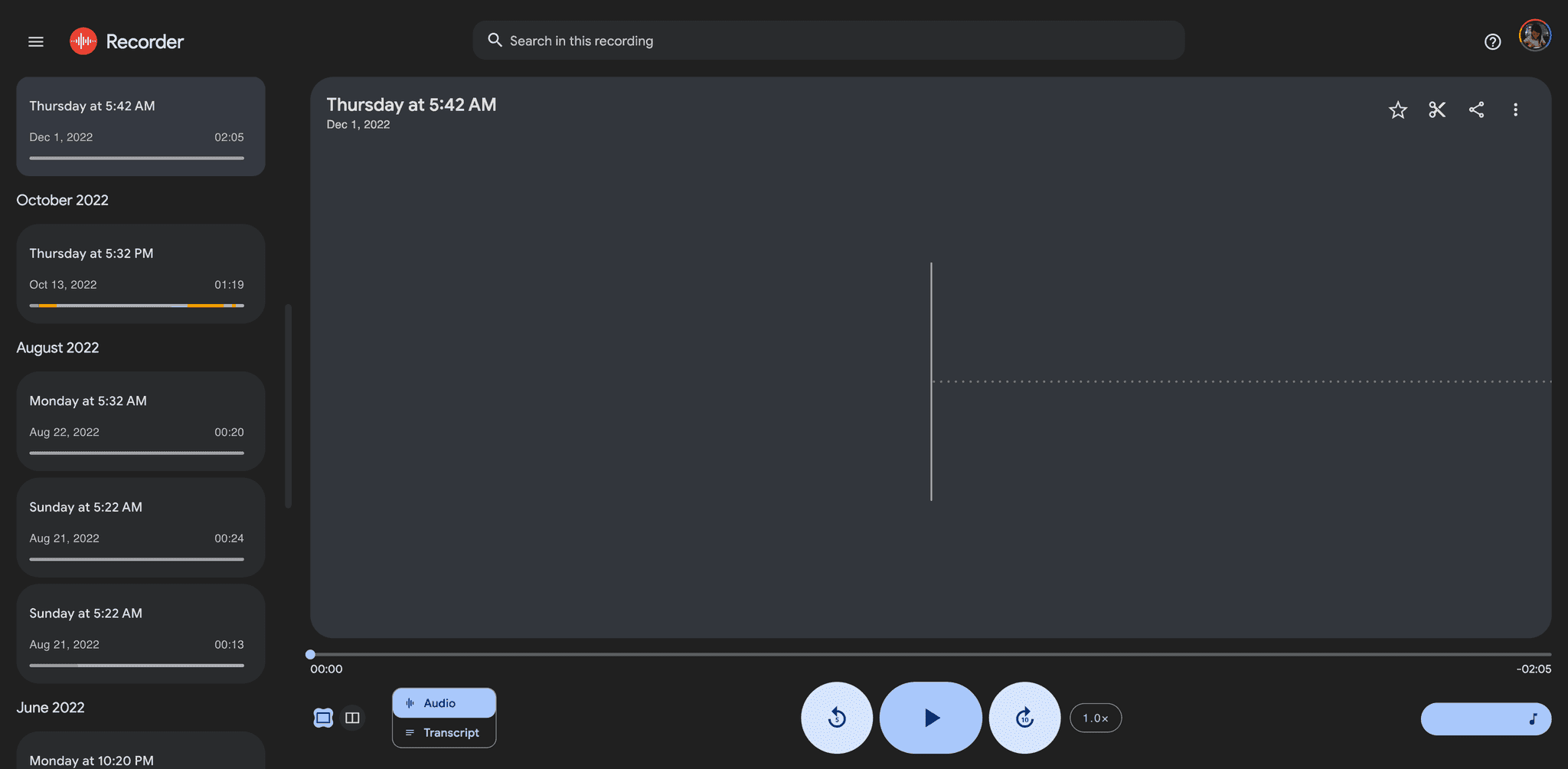
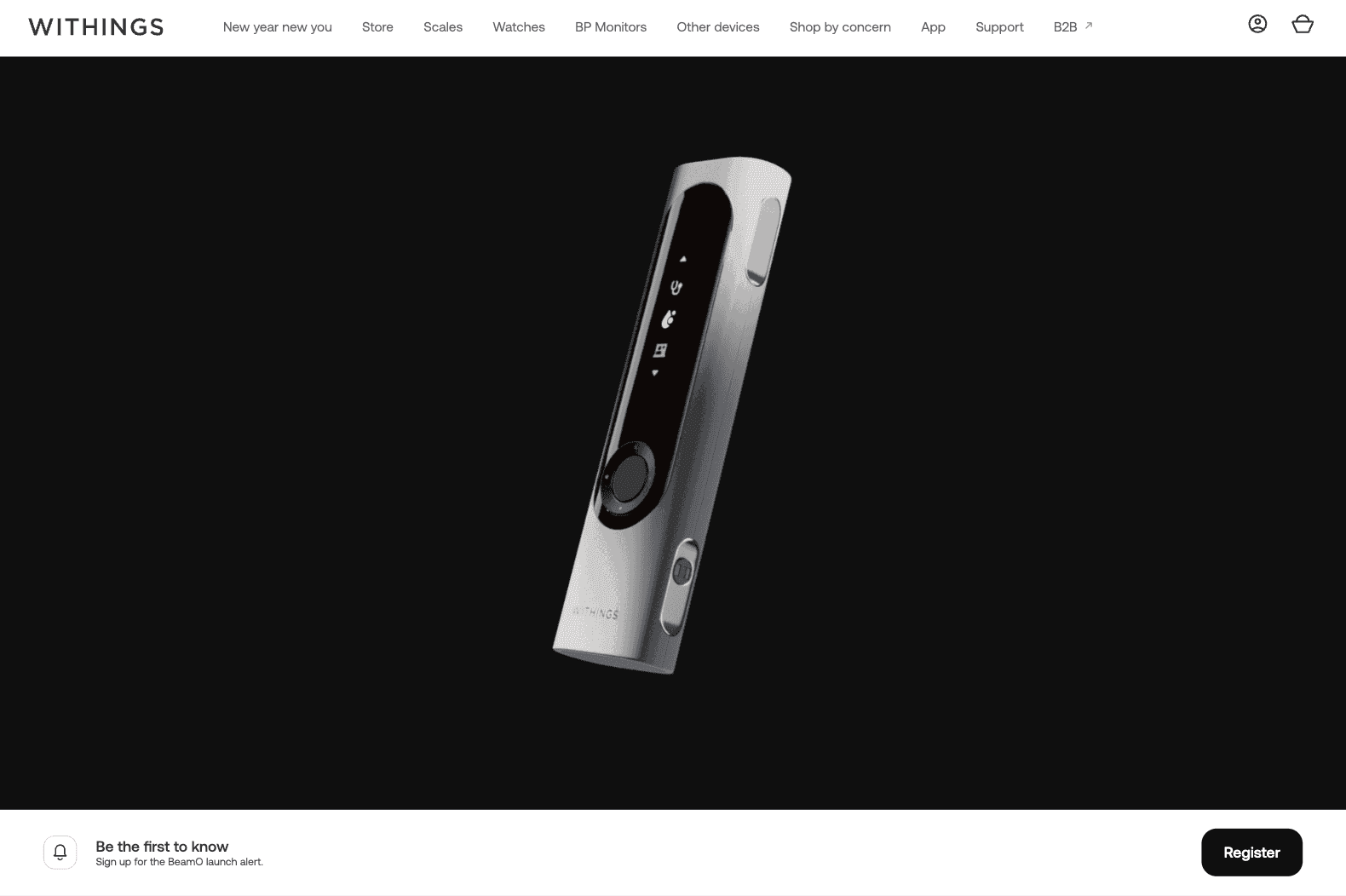
To gain insights into how similar products are designed and function, I conducted UX research by examining websites such as Oura, Withings, and Google Recorder. I found that card views are particularly effective for displaying individual sessions. Then I drew inspiration from Google Material Design guidelines and Dribbble for layout and UI elements.
Key takeaways from other products
- Oura utilizes high-resolution imagery to seamlessly integrate visuals with text, creating a polished presentation.
- Google Recorder showcases a clean UI with card-based lists of recording sessions and a prominent sound wave display, which inspired the idea of displaying all sessions and details in a single view.
- Withings features an advanced electronic stethoscope on a sleek, high-end website, setting a standard for medical device presentation.
Oura
Google Recorder
Withings
Sprint Context
With our user stories decided, we broke up the redesign of Korion Health into 2 different sprints. Each sprint consisted of Research, Ideation, Design, and Iteration processes.
- Sprint 1: Landing Page (Value Proposition section, Footer section)
- Sprint 2: Recording Sessions (All Recordings screen)
Competitor Analysis
My responsibilities for the landing page included the Value Proposition and Footer sections. To better understand the elements of the sections, I analyzed competitors like Incheq and explored design inspiration on platforms like Dribbble, identifying common components from similar websites.
Key Takeaways
- For the Value Proposition section, incorporating a card carousel to showcase benefits is a good practice.
- The Footer should include the company name and logo, navigation links, and legal information, arranged in a balanced layout rather than clustered on one side.
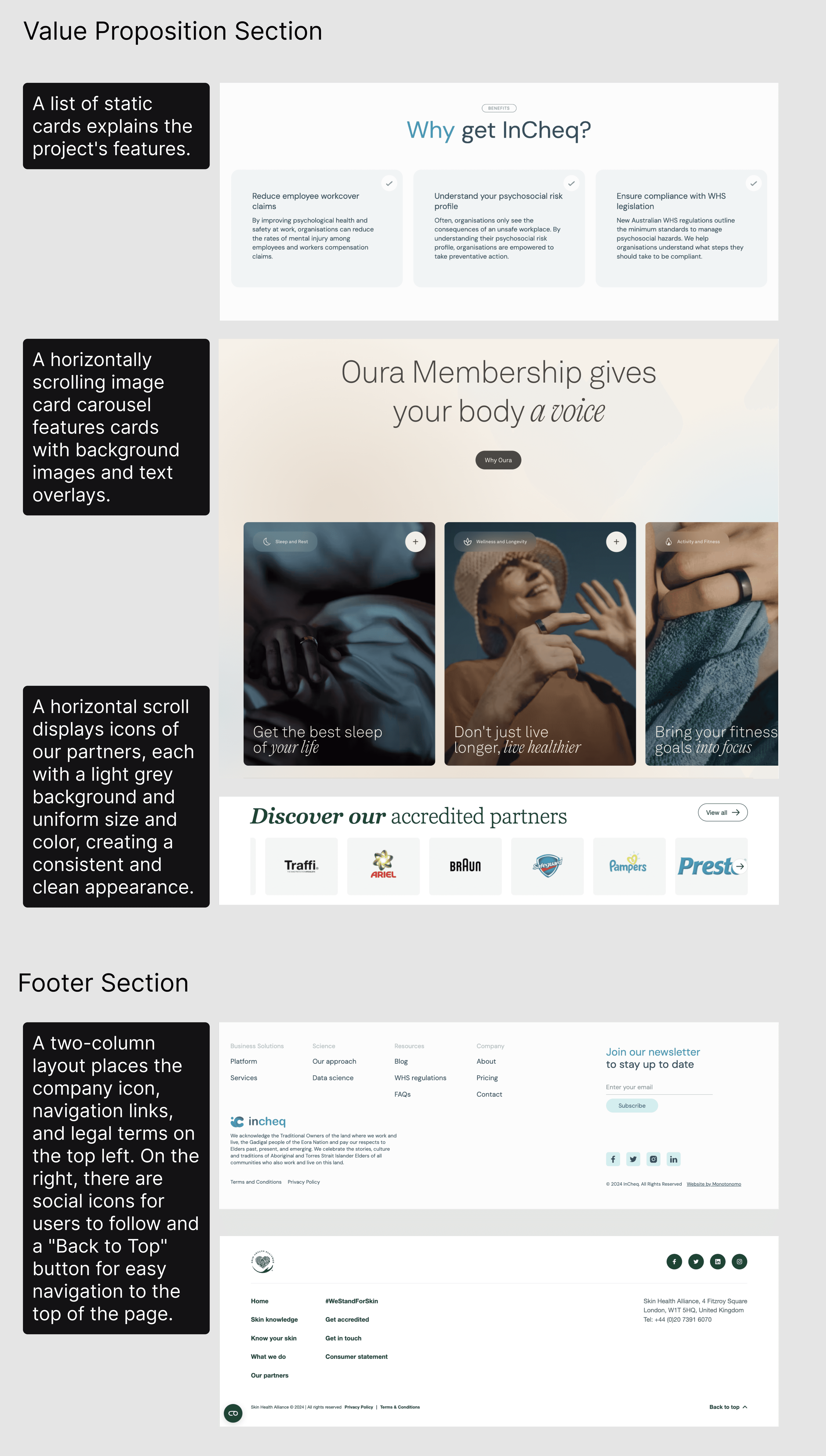
Competitor research and design inspiration
Ideation & Wireframe
I experimented with various layouts for the Value Proposition and Footer sections, adjusting UI elements layout and image sizes to establish a clearer visual hierarchy.
Key insights from experimenting with layouts:
- Value proposition sections can use a card carousel, with each card highlighting key benefits, sometimes featuring a background image.
- Partner logos should be high-quality images presented in a carousel format.
- Social media logos in the footer are in a monochrome scheme that aligns with the website's design.
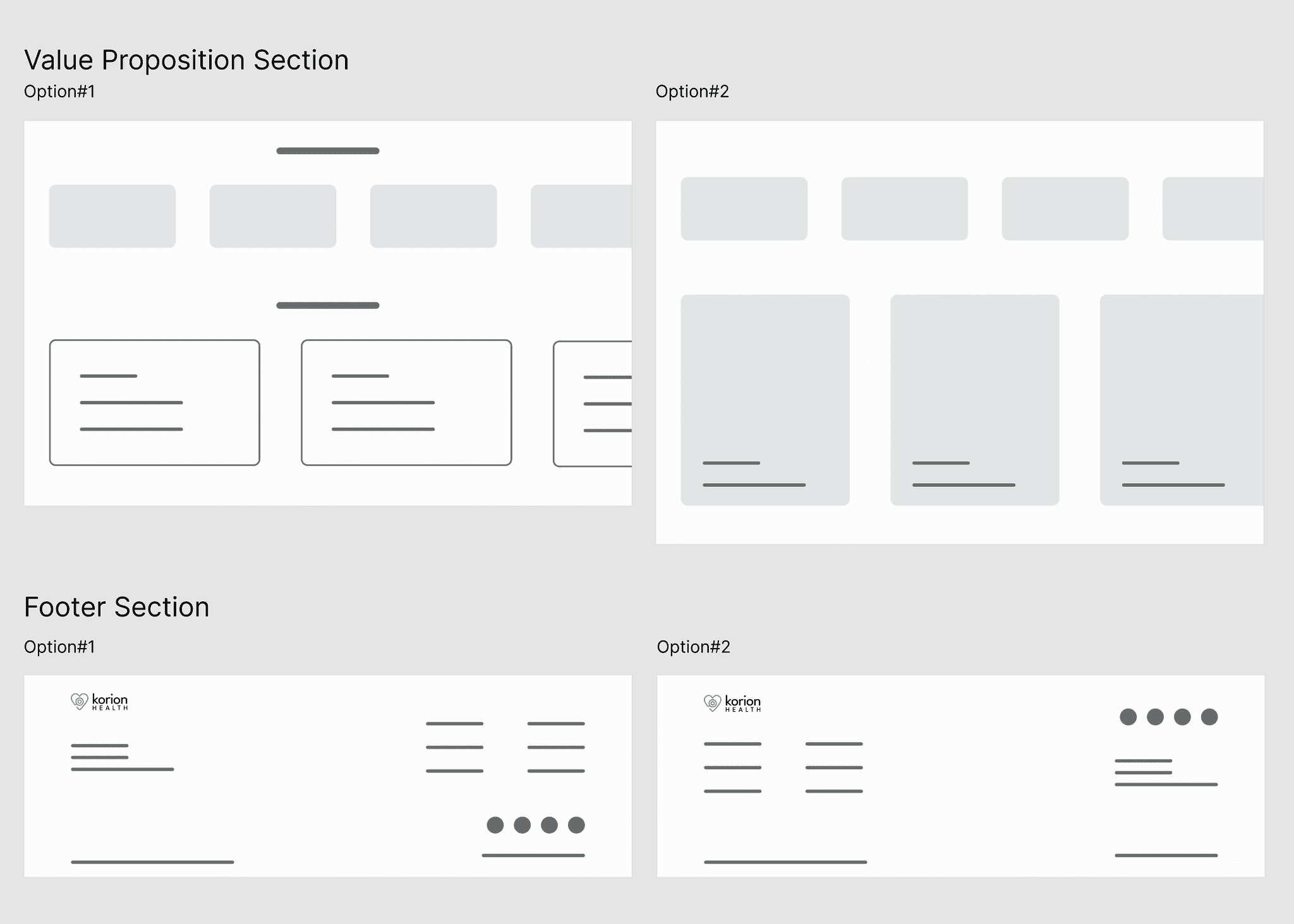
Layout experiments and wireframes
Iterations
After integrating the sections each team member worked on into a single product, I identified areas for improvement to ensure my sections blended seamlessly with the overall design. For example, the card background images needed to be more relevant to the text, and a newsletter sign-up field was added to the footer.
Value Proposition Section
- In Iteration#2, a background color was added to the Value Proposition section to distinguish it from the Partners section. A header and subtitle were also included to summarize the value, ensuring consistency with other sections of the landing page.
- In Iteration#3, the background was updated with images featuring diverse demographics to promote inclusivity, along with an image of our actual device to better align with the product.
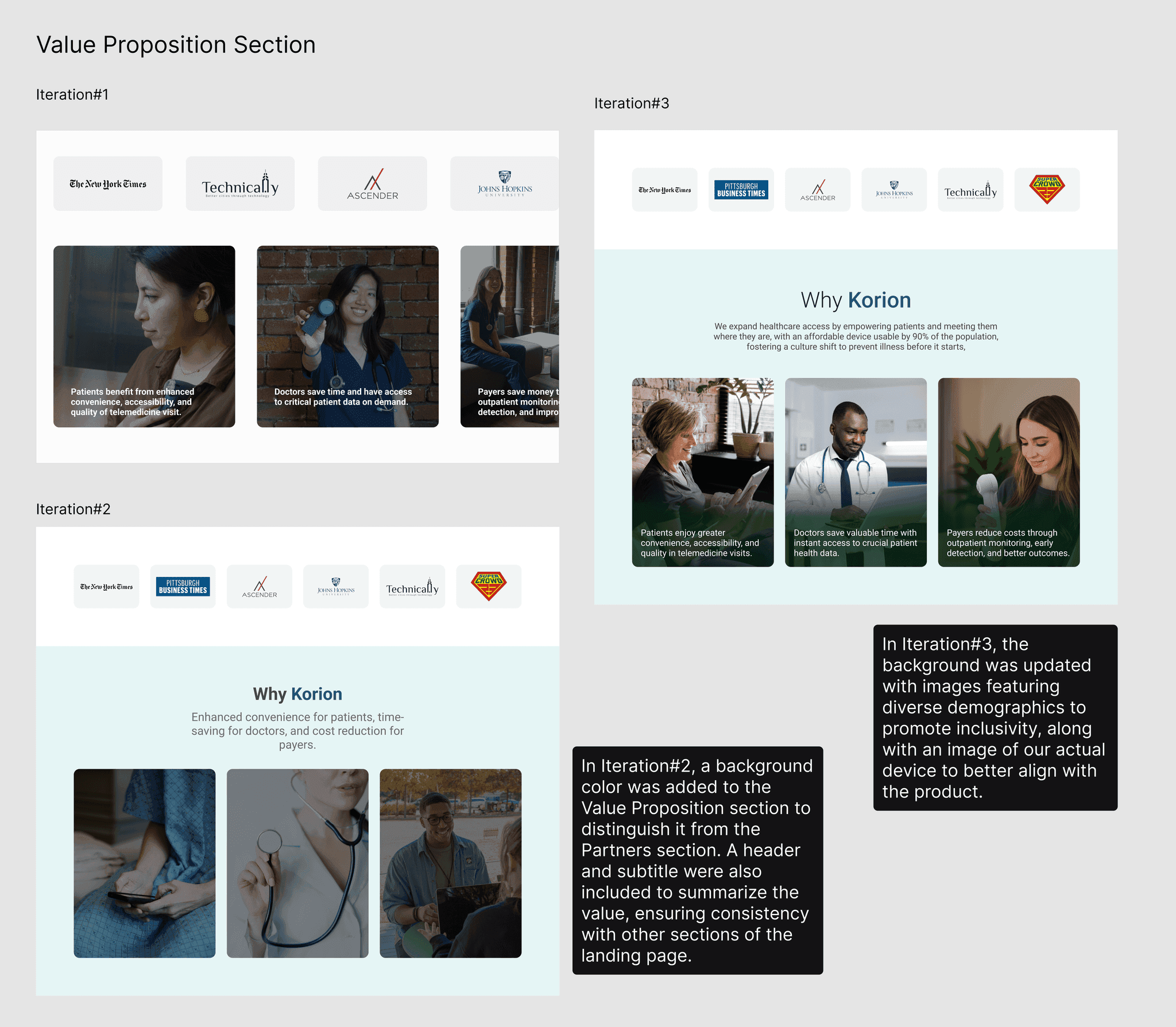
Value Proposition section iterations
Footer Section
- In Iteration#2, the social icons were changed to a monochrome color to reduce distraction, a subscription field was added to increase user engagement, and the address field was removed as it provided no significant value.
- In Iteration#3, the background color was updated to a dark tone, maintaining consistency with the overall style while slightly differentiating it from the main content.
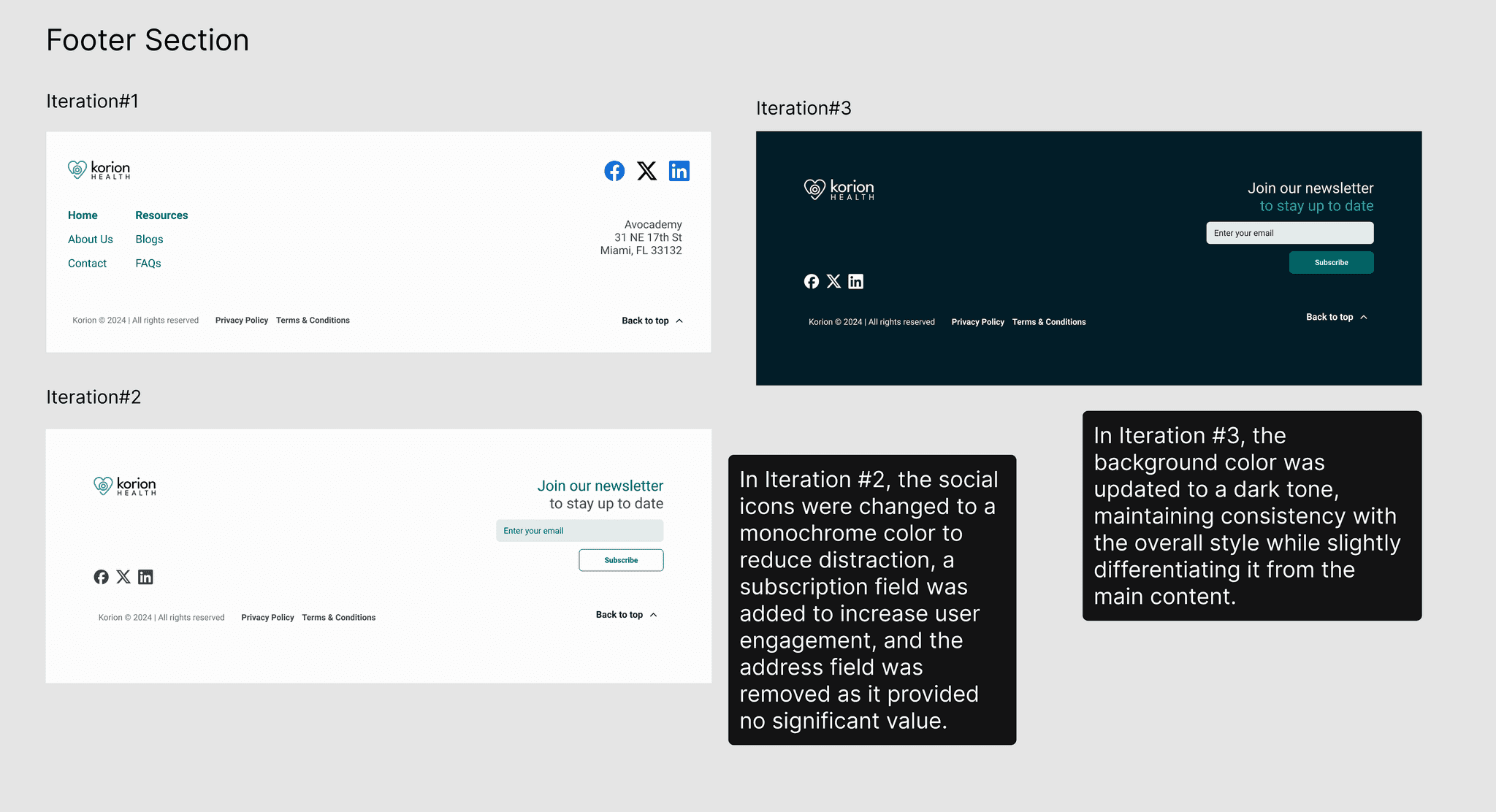
Footer section iterations
High Fidelity Mockup
Below is the Hi-Fi design for Value Proposition section and Footer section.
Value Proposition section design
Competitor Analysis
My responsibility for the recording sessions was to design the screen for all recordings. To better understand the key elements and common practices for such screens, I analyzed websites with similar functionalities, including Google Recorder, Oura, One Medical, and Withings.
Key Takeaways
- A potential layout, inspired by Google Recorder, features a list of recordings on the left, with the main area displaying details when a recording is selected.
- A Tab layout with a tab bar positioned below the section header and above the table view is effective.
- Adding a search bar helps users quickly locate a specific recording from a long list.
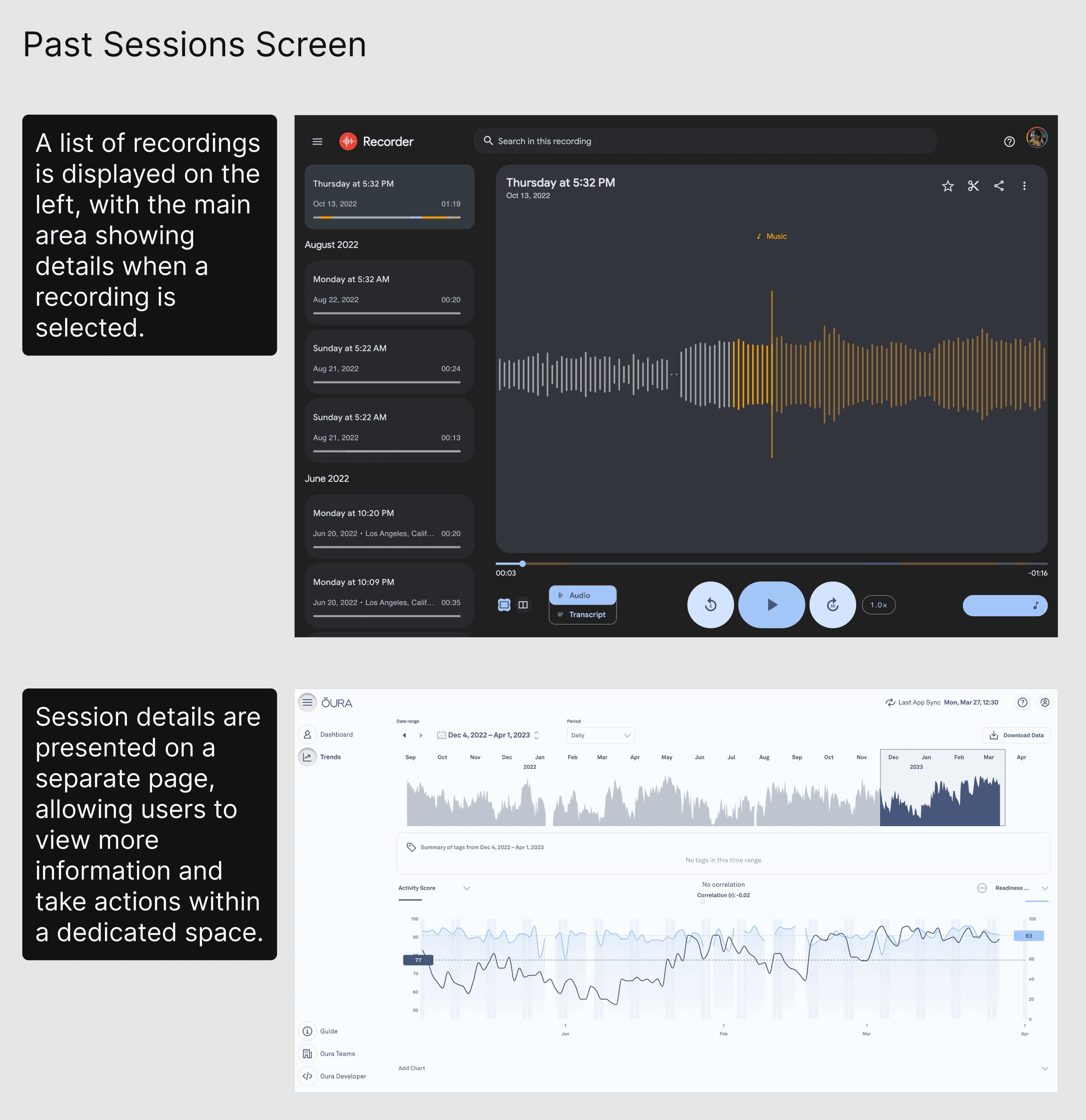
Competitor research and design inspiration
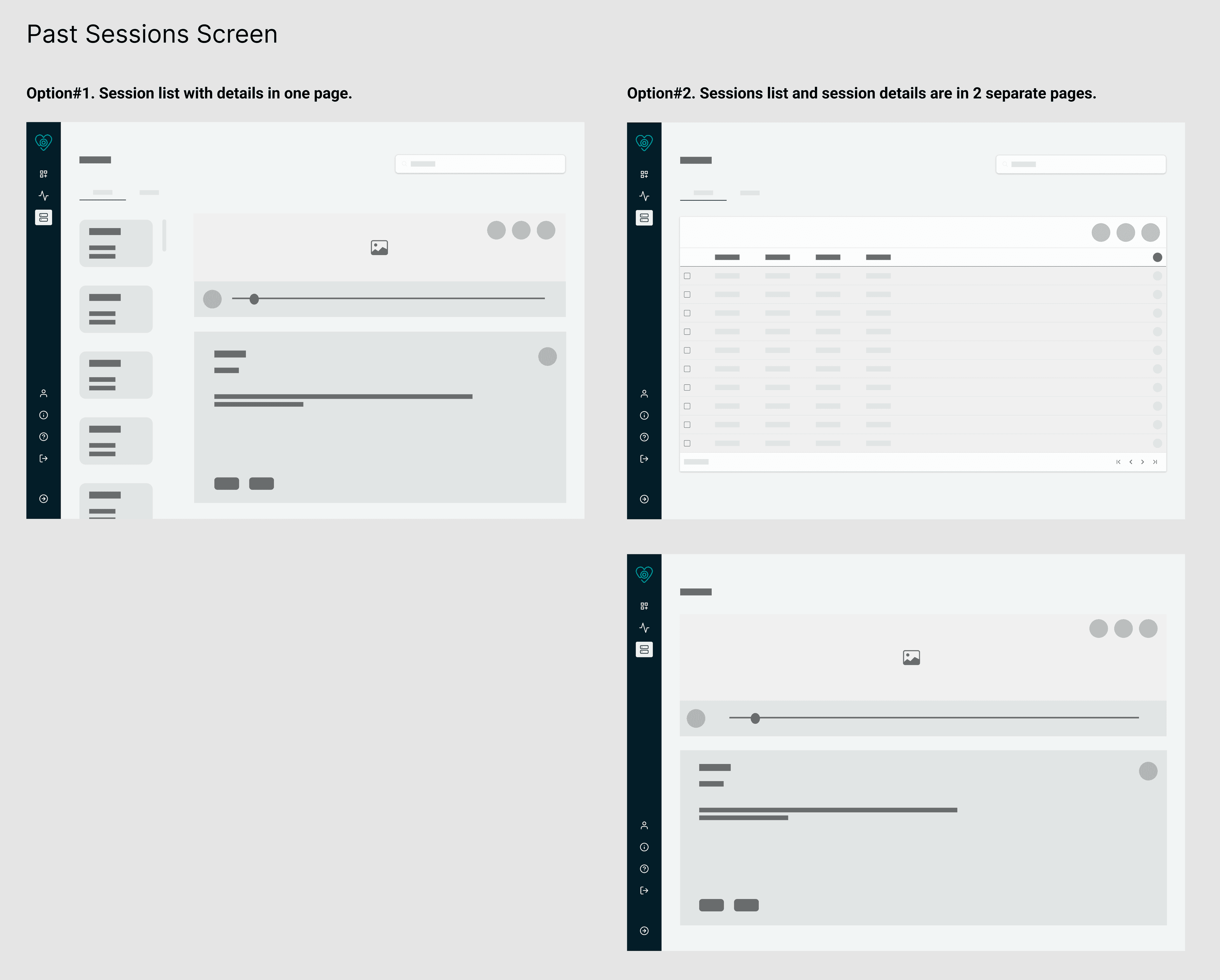
Layout exploration for recording sessions
Ideation
I explored two layout options for the Past Sessions screen. Option 1 displayed the recording list and details on the same page, while Option 2 separated them into two screens, with details opening on a new page when selected.
Option 1. List and Details on One Page
Pros
- All content is on one page, and no need to open a new page for details.
Cons
- Users cannot perform batch actions like delete, share, or download across multiple sessions.
- Finding a specific session may be harder, relying heavily on search and filter functions.
Option 2. List and Details on Separate Pages
Pros
- Cleaner, less cluttered UI.
- Easier session navigation.
- Supports batch actions.
Cons
- Requires opening a new page for details.
After discussions, I chose Option 2 to create a cleaner, more organized UI that enhances user navigation and action clarity while providing sufficient space for recording details.
High-Fidelity UI Design
In the Hi-Fi stage, I added relevant images and text to the wireframes I designed. For the All Recordings section, I developed multiple UI alternatives for the card layout. I created Hi-Fi mockups for both options to give our team a clear visual understanding of how the cards would appear in the All Recordings section.
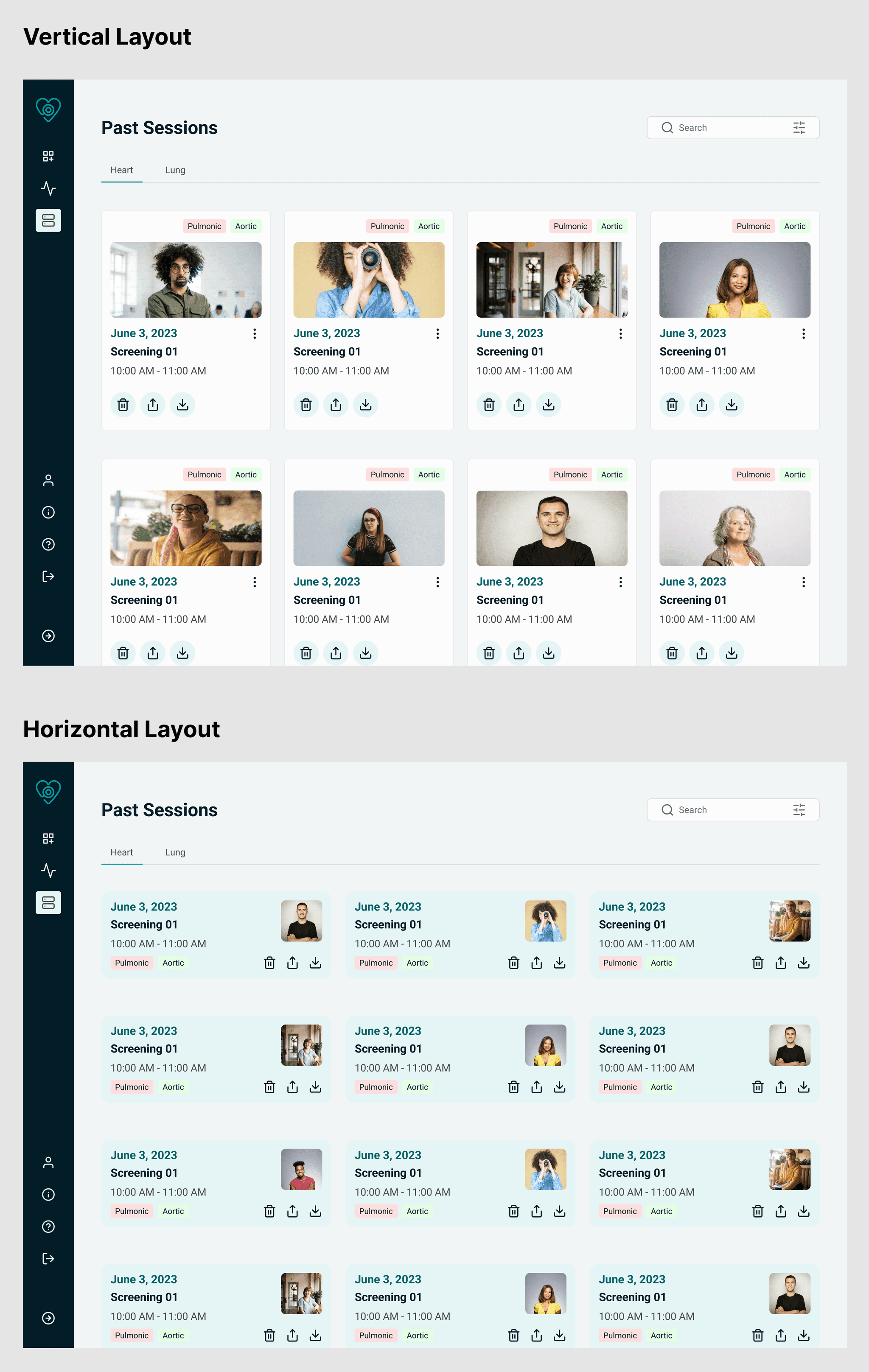
Vertical and horizontal card layout variants
Card Layout Options
I designed two variants for Past Sessions card layouts: vertical and horizontal.
- The vertical layout features a larger header image for quick content identification but displays fewer cards per screen.
- The horizontal layout is more compact, showing more cards at once, though the smaller header image makes content harder to identify; it's more useful if users rely on dates and times instead of images.
Each variant has its strengths—vertical cards are visually impactful, while horizontal cards save space. We're testing both layouts on the dashboard screen and gathering client feedback to evaluate their effectiveness. After discussing with our clients, they would go with a vertical layout.
Iterations
After combining all team members' sections into a cohesive product, I identified areas for refinement to ensure my sections integrated smoothly with the overall design. I iterated on the recording session card, making the following changes:
- Iteration #2: Adjusted the card layout to a side-by-side format with image and text, creating a more modern and visually appealing design.
- Iteration #3: Removed the recording title, as users could rely on timestamps and tags for identification. Quick actions like delete, share, and download were moved to an overflow menu, streamlining the interface and enhancing the overall cleanliness of the design.
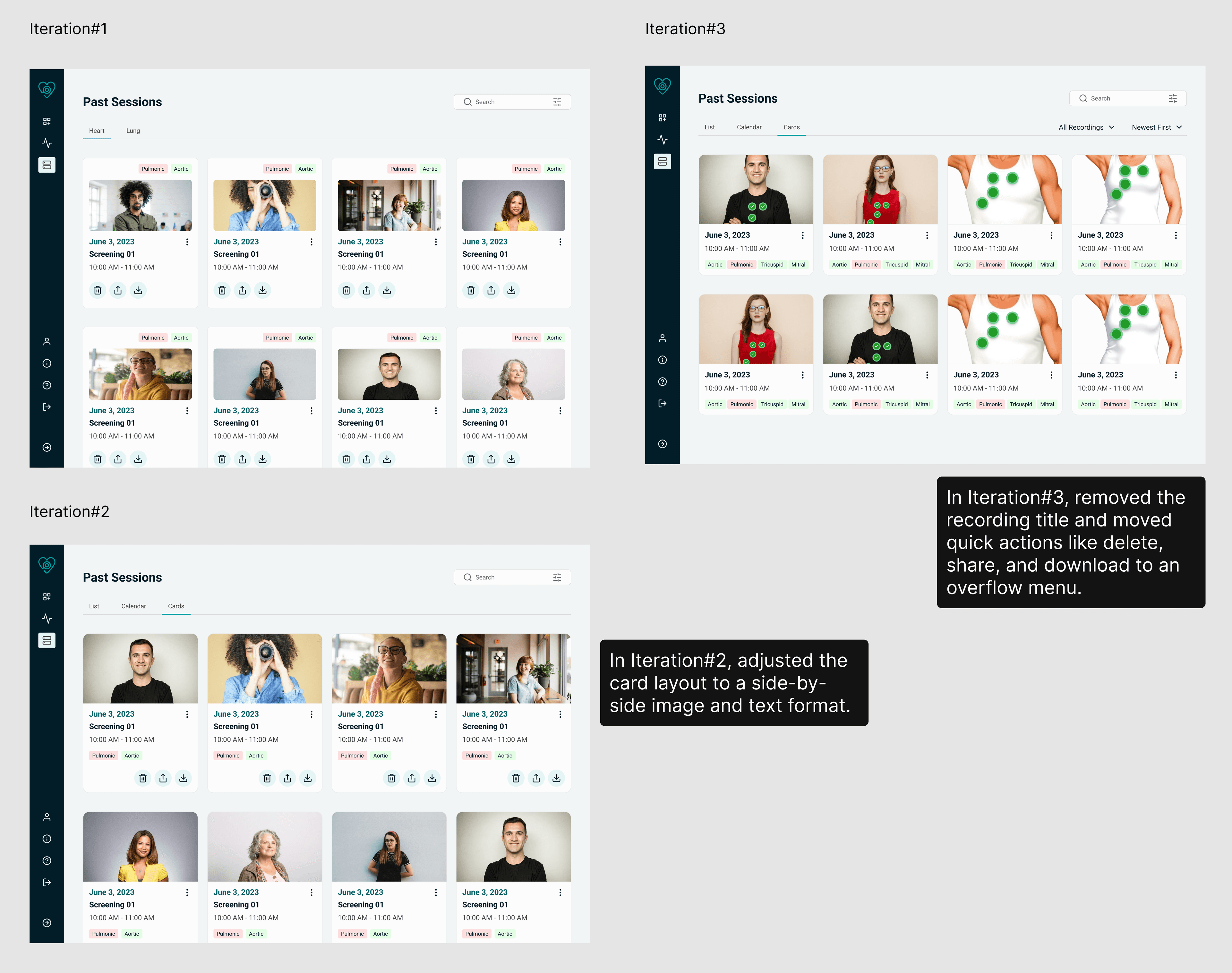
Recording session card iterations
High Fidelity Mockup
Below is the Hi-Fi design for Value Proposition section and Footer section.
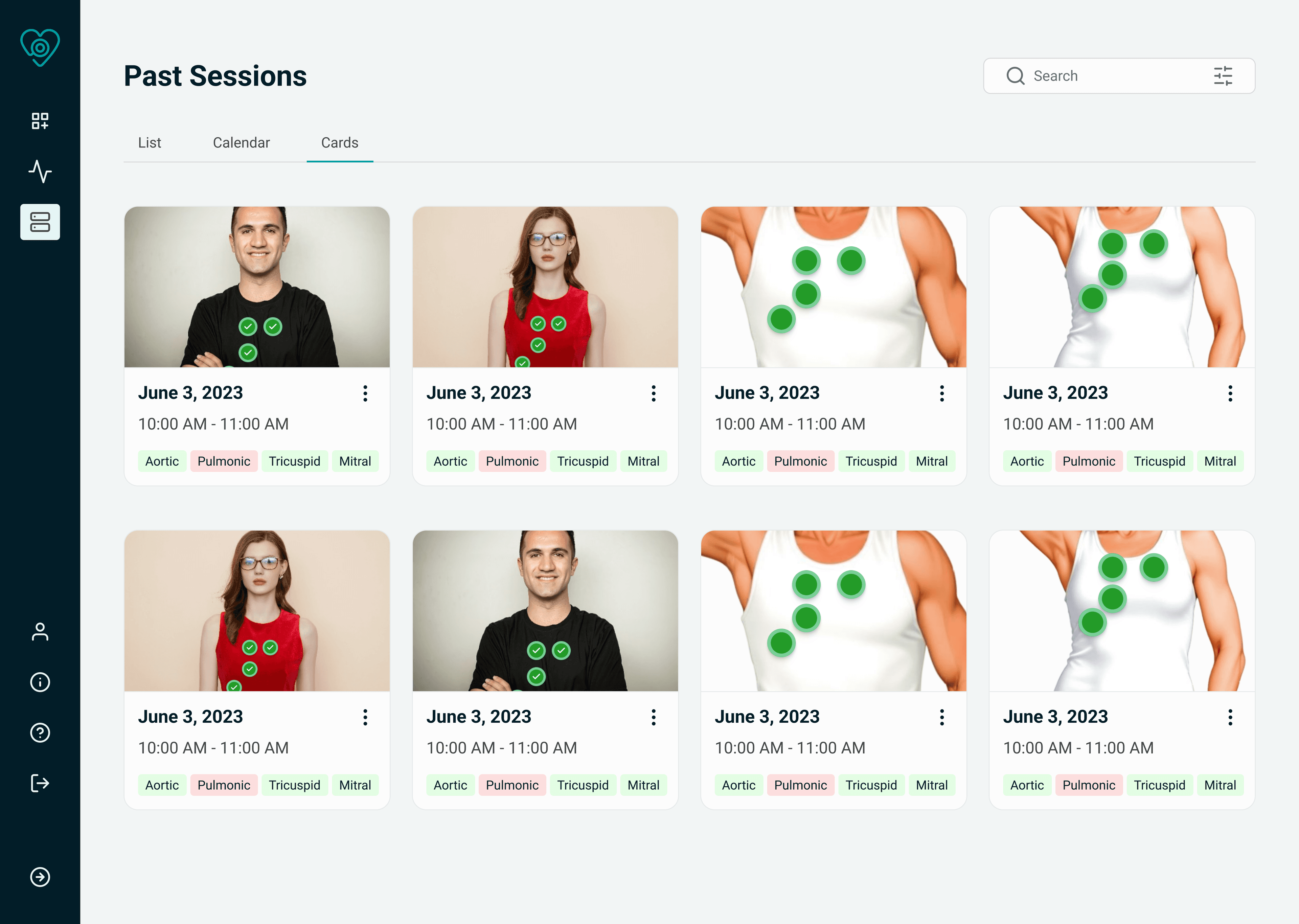
Value Proposition section design
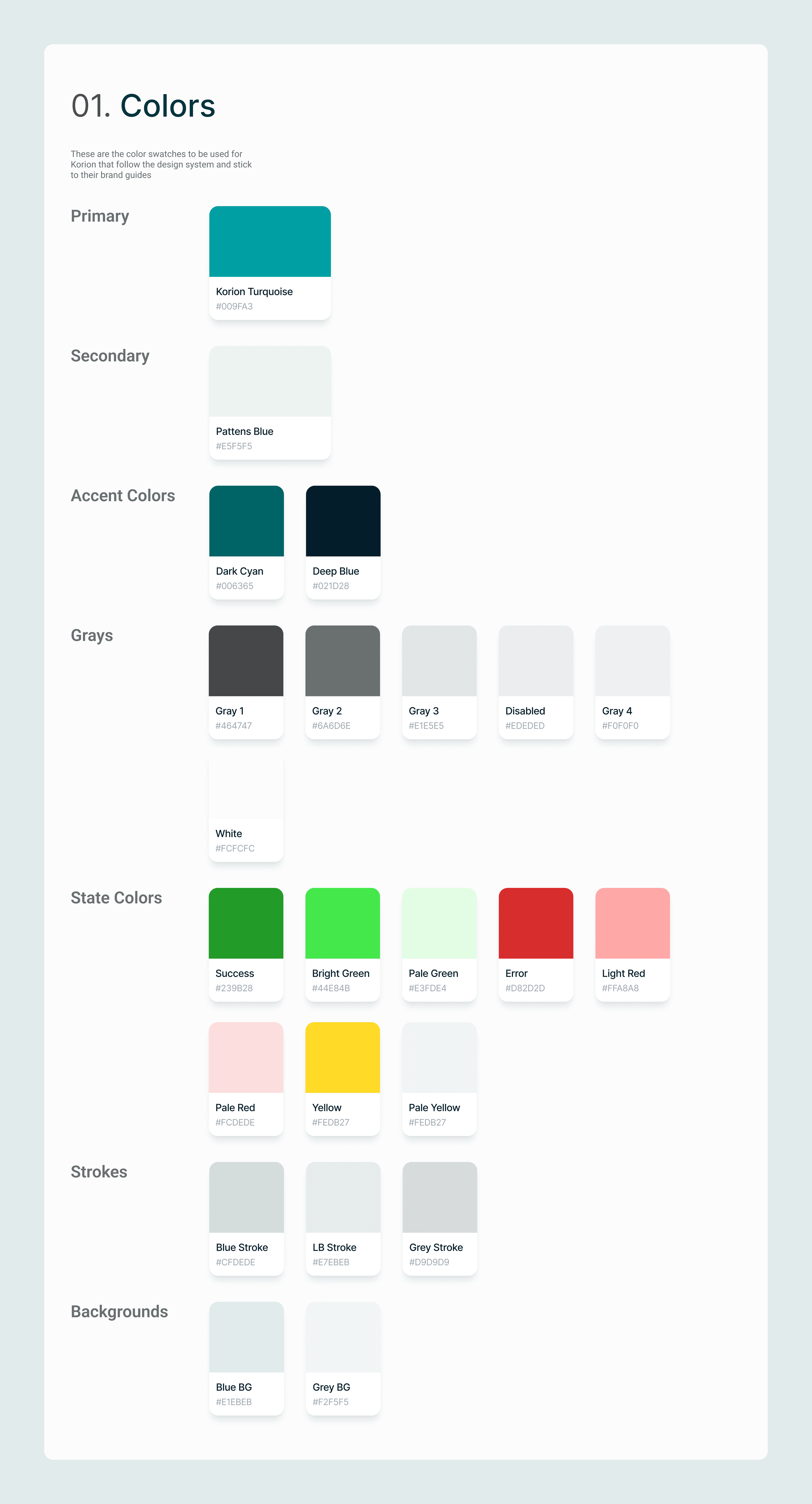
Design system component 1
Style Guide
The style guide is a crucial component of my UX design process, ensuring consistency in color, font, components, and icons throughout the app.
- We selected Turquoise Blue as the primary color to reflect a more professional tone and maintain consistency with the brand logo.
- For Font, we chose the Roboto font, popular for desktop websites and mobile apps and compatible with most systems, to ensure readability and uniformity.
Design Handoff
I prepared a developer handoff with precise measurements and annotations to fill in details not shown in the high-fidelity mockups, including pixel dimensions and explanations of key design decisions for specific use cases.
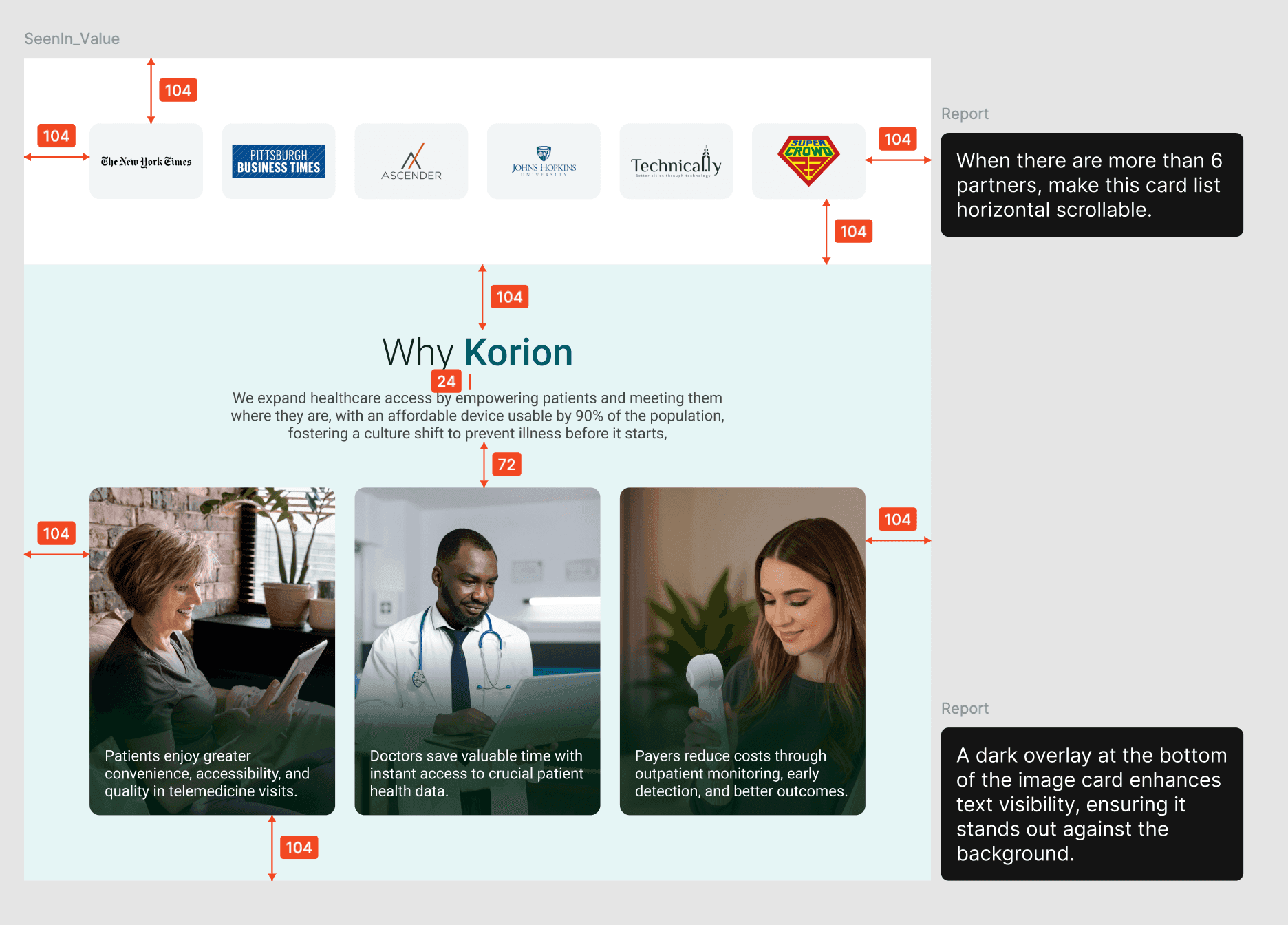
Design handoff documentation 1
Challenges
- Component duplication was a challenge when my teammate and I independently created similar but slightly different components. I added comments in Figma with suggested fixes and worked with the team to resolve duplicates, aligning on component creation in advance.
- Inconsistent styles across sections created a disjointed design. We tackled this through several iterations, refining the design for a cohesive look.
- Designing for a medical product without being the target user was another challenge. I overcame this by reviewing client interview videos, conducting competitor research, and exploring industry trends to better understand user interactions and the design landscape.
What's to come
- Enhance Measurement and Metrics: Incorporate metrics and success indicators from the start to monitor design performance over time, enabling data-driven decisions to boost user engagement and design effectiveness.
- Develop a Physician Portal: Create a portal for physicians to review patient recordings and provide feedback, ensuring that all users benefit from the product.