Juna
A B2C chronic care web platform delivering holistic weight management support and GLP-1 medication.

BusyOtter website design showcasing the product
Overview
Juna specializes in weight management, aiming to close healthcare gaps through high-quality, accessible, and timely care.
The Challenge
In September 2024, Juna relaunched its website to address low conversion rates, but the update led to a significant drop in sign-ups on the new version. Our challenge was to uncover the reasons behind this decline and explore how to redesign the landing page to effectively boost conversion rates and user engagement. Additionally, using Juna across devices (desktop, tablet, mobile) resulted in an inconsistent experience due to the lack of responsive design.
The Solution
Our design team conducted UX research to understand the recent drop in sign-ups on the new website version, analyzed both versions for insights, and developed data-driven recommendations. The ultimate goal was to redesign the site to enhance user engagement and significantly improve sign-up rates.
Role
UI/UX Designer and Researcher
Tools
- Figma (Design)
- Hotjar (Website Analytics)
- Monday (Project Management)
- Google Meet & Loom (Team collaboration)
Process
- Discover
- Sprint 1
- Sprint 2
- Delivery
- Reflection
Kickoff Meeting
In our kickoff meeting, we reviewed client materials including interviews and website analyses to understand Juna's brand, product, and key features. We aligned on goals, defined next steps for UX research, and aimed to uncover why sign-up rates were dropping. We also planned to create a style guide to improve consistency in color and typography. The final objective was a responsive landing page for desktop, tablet, and mobile.
Sprint Context
We divided this project into two sprints:
- Sprint 1: UX research & client presentation. Analyzed Hotjar recordings to identify UX/UI issues affecting sign-ups and conversions. Presented key findings, root causes, and proposed solutions to the client.
- Sprint 2: Landing page redesign. Redesigned the Juna landing page based on research insights, creating a responsive design for desktop, tablet, and mobile.
UX Research
To identify UX and UI issues causing low conversion rates on Juna's landing page, I conducted in-depth UX research. I analyzed Hotjar recordings, including click, move, and scroll maps, to understand user behavior. Using Jakob Nielsen's Heuristics, I evaluated user actions and pinpointed problem areas. Comparing screenshots of the high-performing previous website with the current version, I identified differences and correlated them with Hotjar data to determine which layouts and text content drove more engagement. I highlighted key sections in the screenshots and annotated them with my findings to clearly present actionable insights.
Heuristic Evaluation
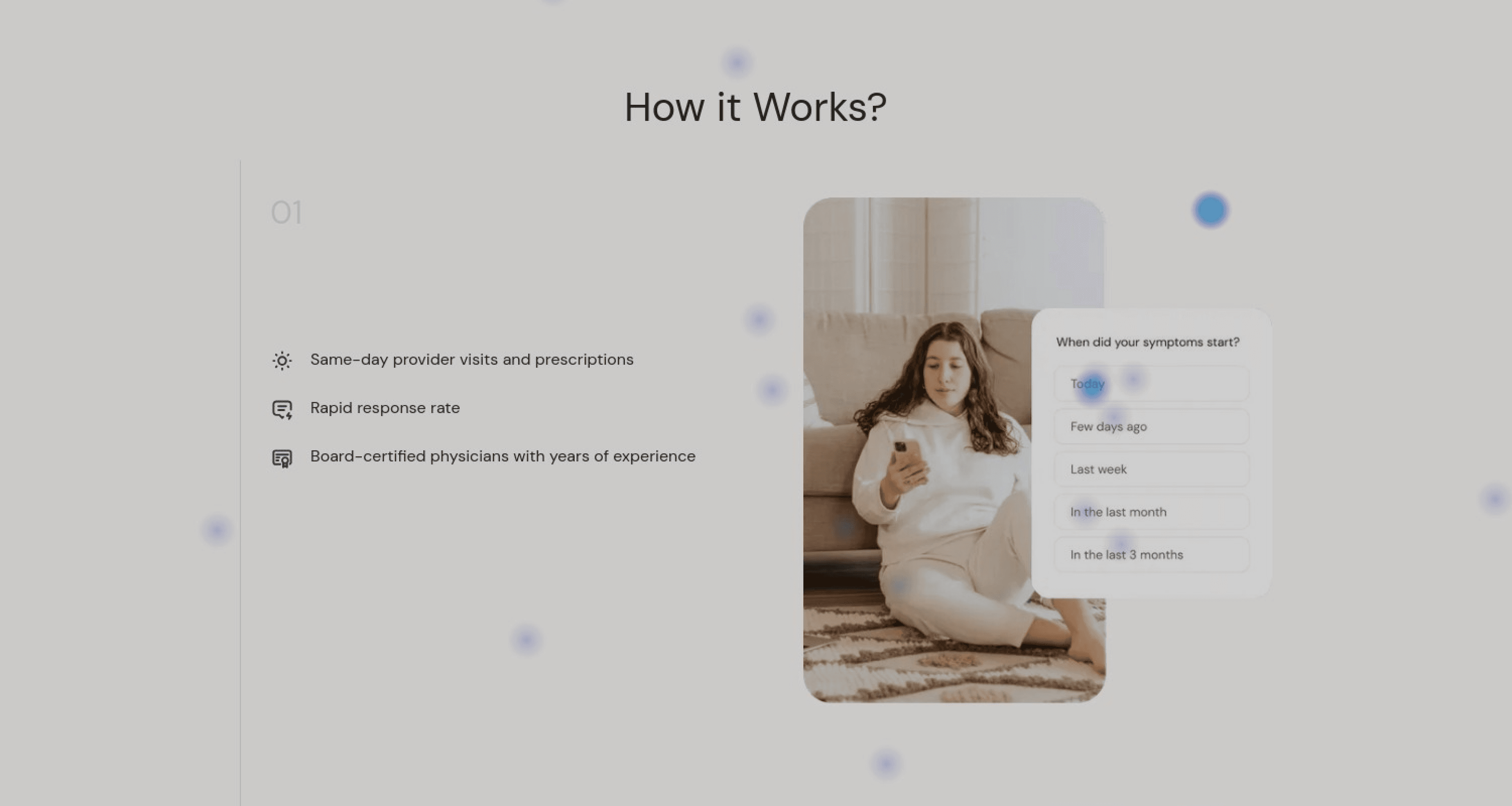
The dialog UI featuring an image illustration is misleading, as 113% of users attempted to interact with it, thinking it was clickable. Additionally, the image is unrelated to the content on the left, violating Nielsen's Heuristic #4 (Consistency and Standards). The content and visuals should align to avoid user confusion.
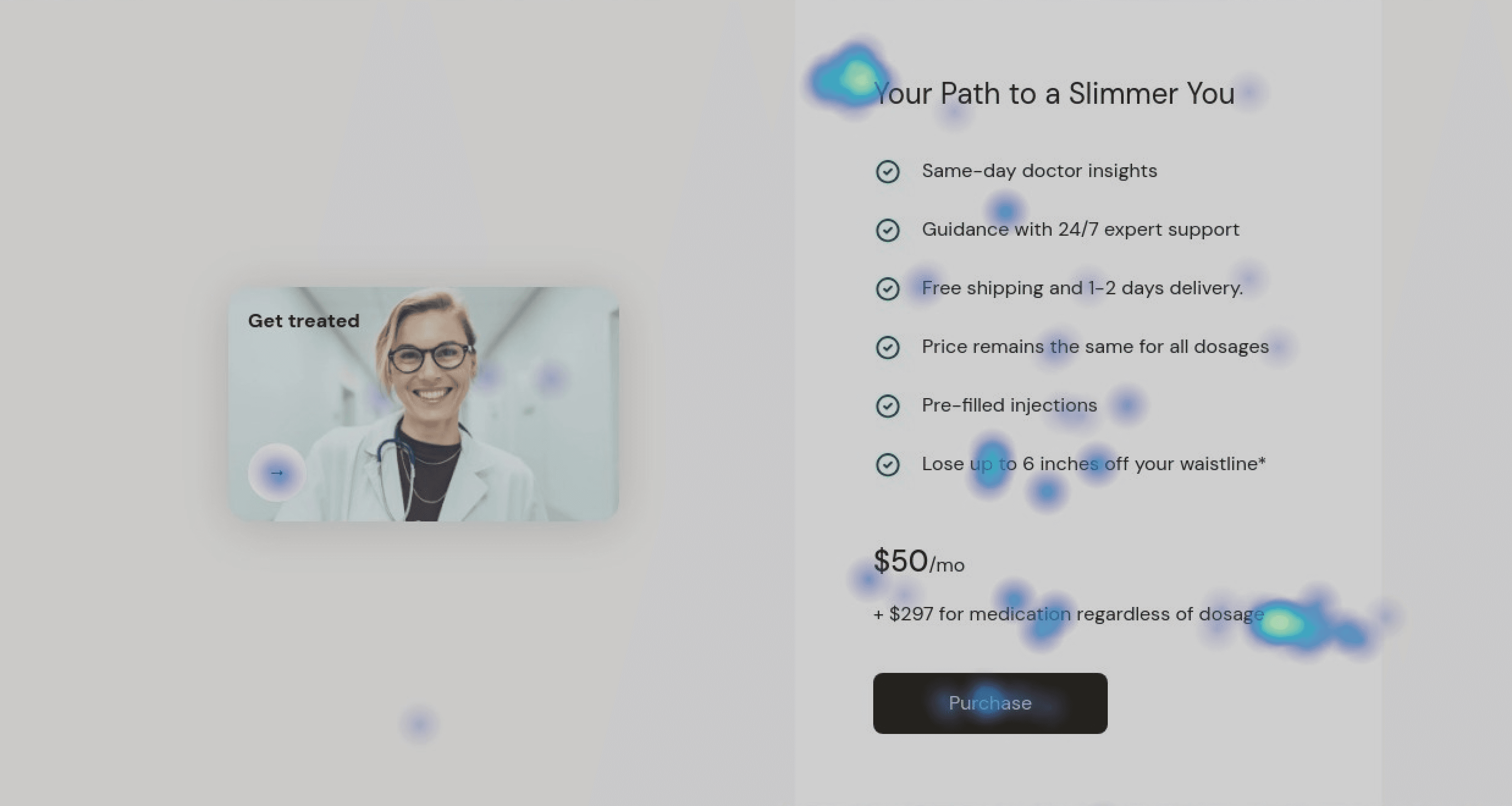
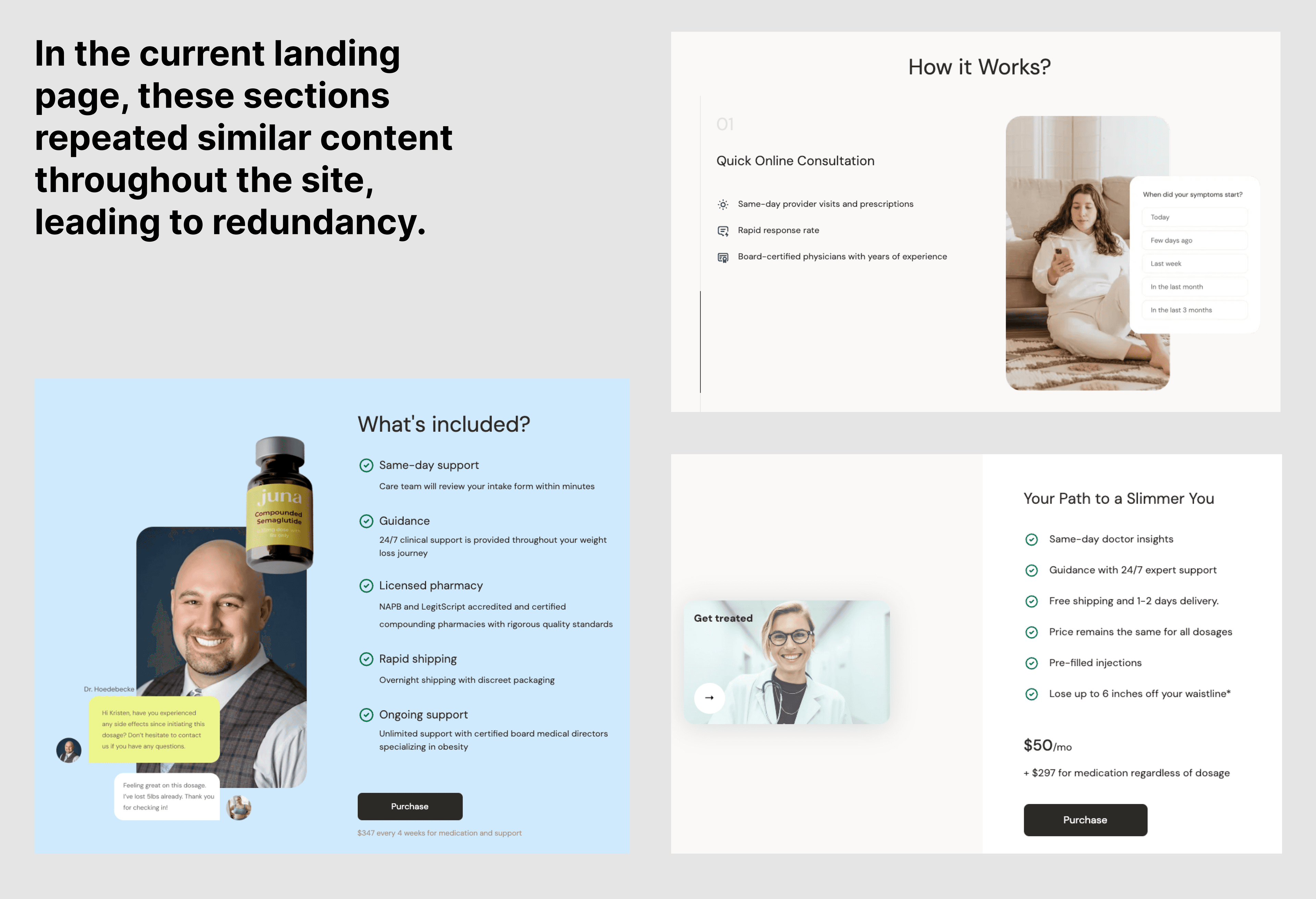
Much of the content duplicates information from the "How it Works" and "What's Included" sections, requiring excessive scrolling. This conflicts with Nielsen's Aesthetic and Minimalist Design heuristic. Recommendation: Merge this content into the "How it Works" section for conciseness.
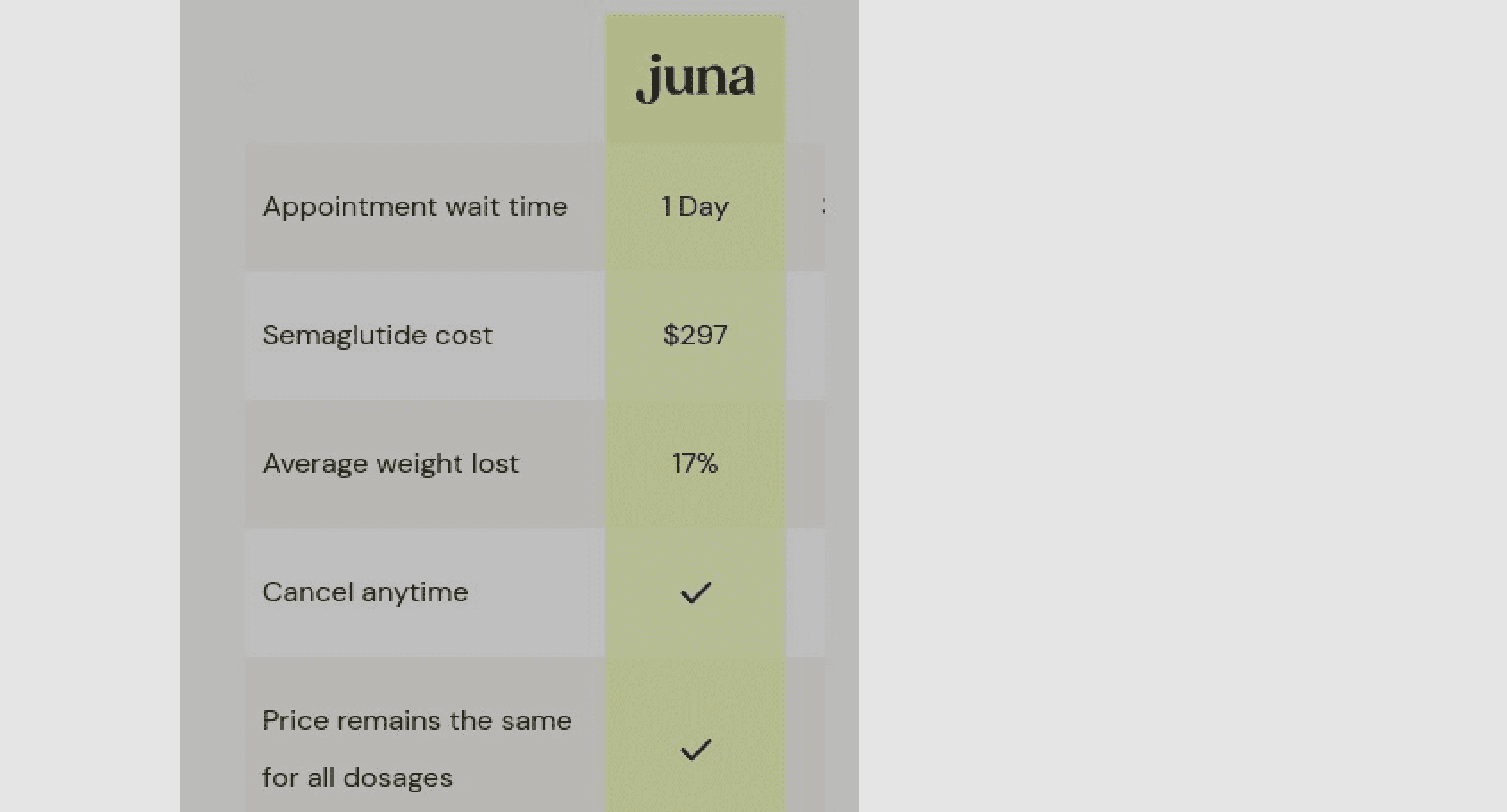
On mobile, 0% of users interacted with the comparison table's horizontal scroll, missing critical information. I would recommend to redesign the table for mobile to ensure all details are visible or prompt users more effectively to scroll.
Client Presentation
We discussed and consolidated our findings into a final research presentation, highlighting key issues, their underlying causes, and our proposed solutions. We then presented the final version to the clients. Based on these findings, we created an action plan:
- Develop a style guide to enhance consistency and improve color and typography hierarchy.
- Redesign the landing page based on research insights, with consideration of interaction differences between desktop and mobile users.
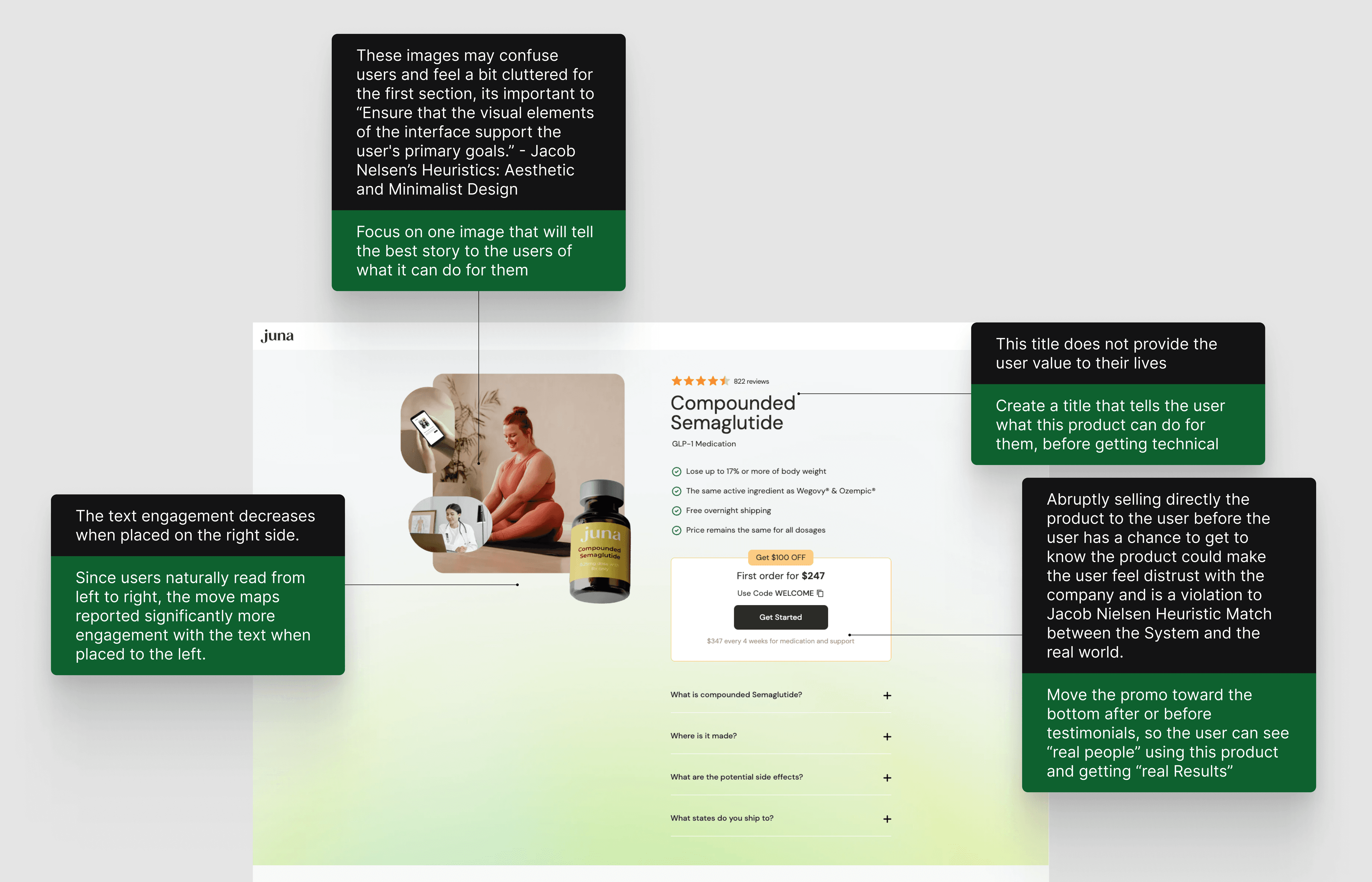
Research findings presentation
Inspiration from modern product websites
Ideation
For this project, I focused on refining the existing Juna website's UI rather than a full design. My role was to ideate and redesign the "How it Works" and "Comparison" sections, exploring various options to enhance these areas.
For the "How it Works" section, I identified redundancy across three areas "How it Works," "What's Included," and "Initial Dosage," all of which covered similar features like fast delivery. After discussing with our team, I decided to consolidate these into a single "How it Work" section. I reviewed the existing content and restructured it into three key points: Rapid Health Support, Effortless Medication Access, and Round-the-Clock Support, with an additional highlight on No Hidden Fees.
Low Fidelity Wireframe
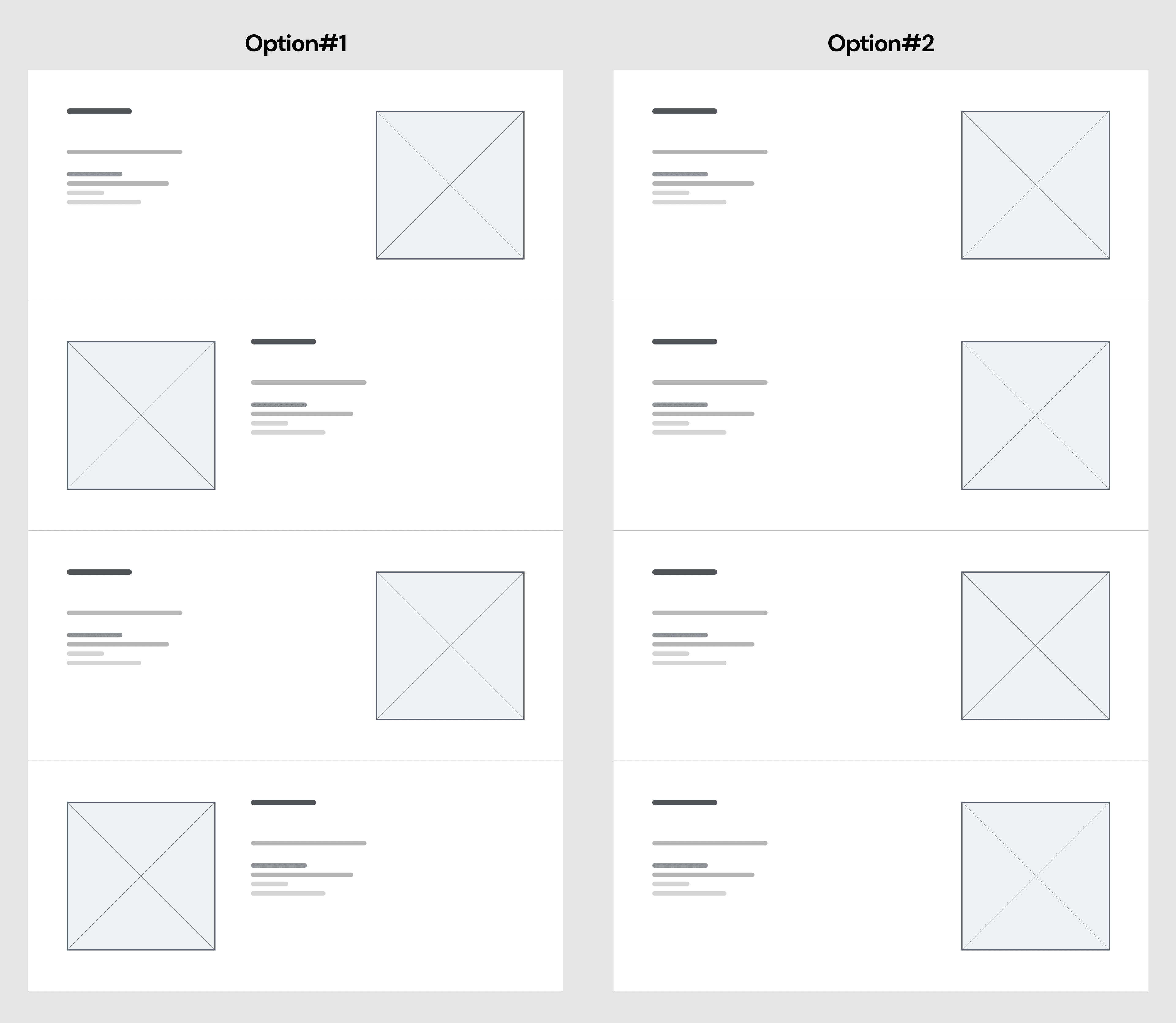
I experimented with various layouts for the "How It Works" section, focusing on the placement of images to enhance the visual experience.
- In option #1, the images alternated between the left and right sides of each card.
- In option #2, all images were aligned to the right.
After evaluating the pros and cons, I chose option #2 for the next design stage. This layout allows for a progress slider on the left, ensuring visual consistency and easy step navigation.
Wireframes defining layout and information hierarchy
High-Fidelity UI Design
Guided by the style guide I created, I transformed wireframes into pixel-perfect high-fidelity screens. These screens visually represented user flows and became the foundation for all design decisions.
Pixel-perfect designs for all key pages
Iterations & Refinement
I went through multiple rounds of design iteration to improve usability and align with real user needs.
How it Works design iterations
"How It Works" Section
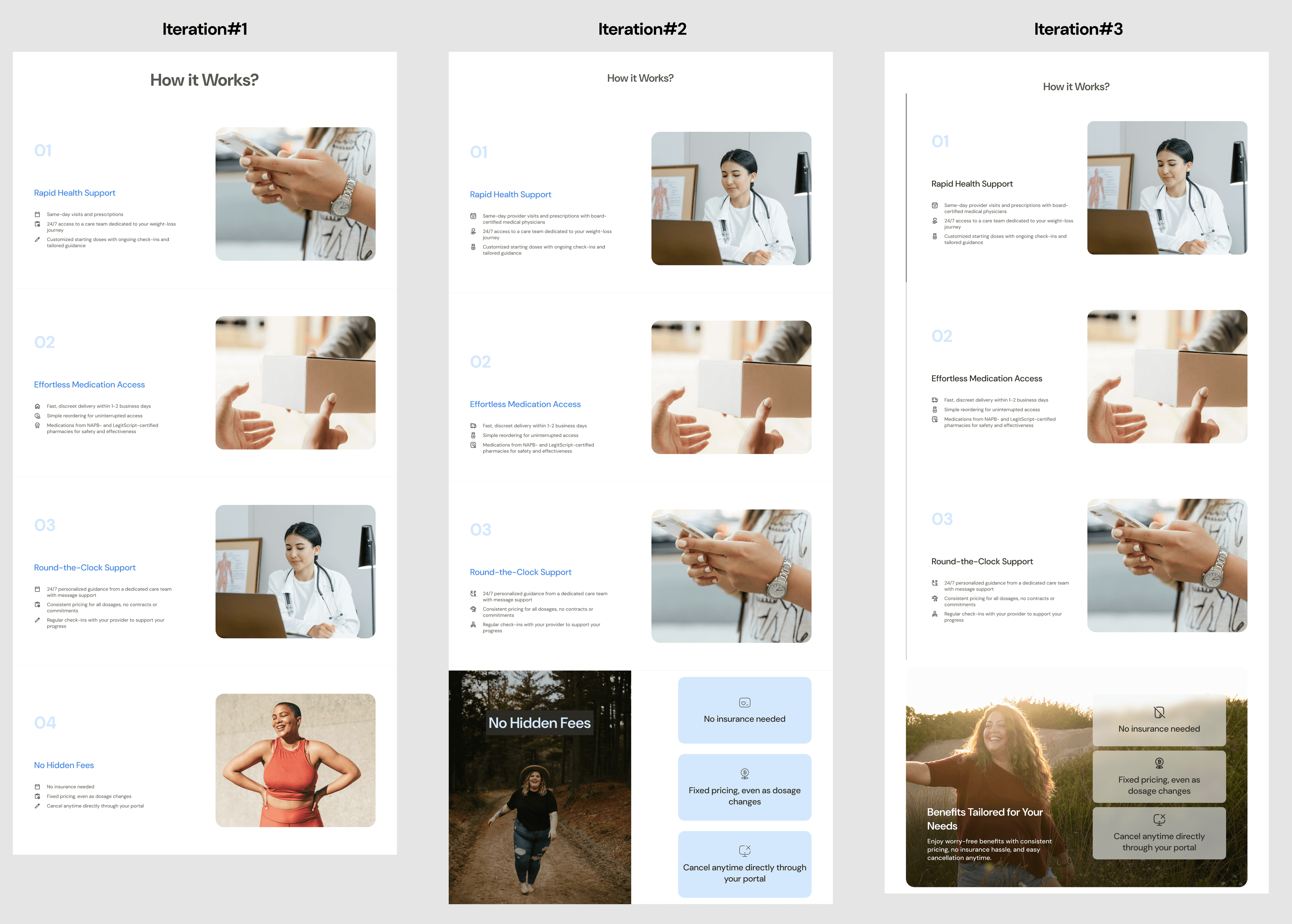
In the "How It Works" section, I went through several iterations:
- Iteration 1: All four features had the same layout—text on the left, image on the right.
- Iteration 2: The last card was given a different layout to reflect its unique feature.
- Iteration 3: Added a left slider to indicate progress and modified the last card with a large background image and three vertical cards for better visual hierarchy.
The design was finalized in iteration 3, featuring the first three cards with the text-left image-right layout, and a stacked card with background image for the last feature.
"Comparison" Section
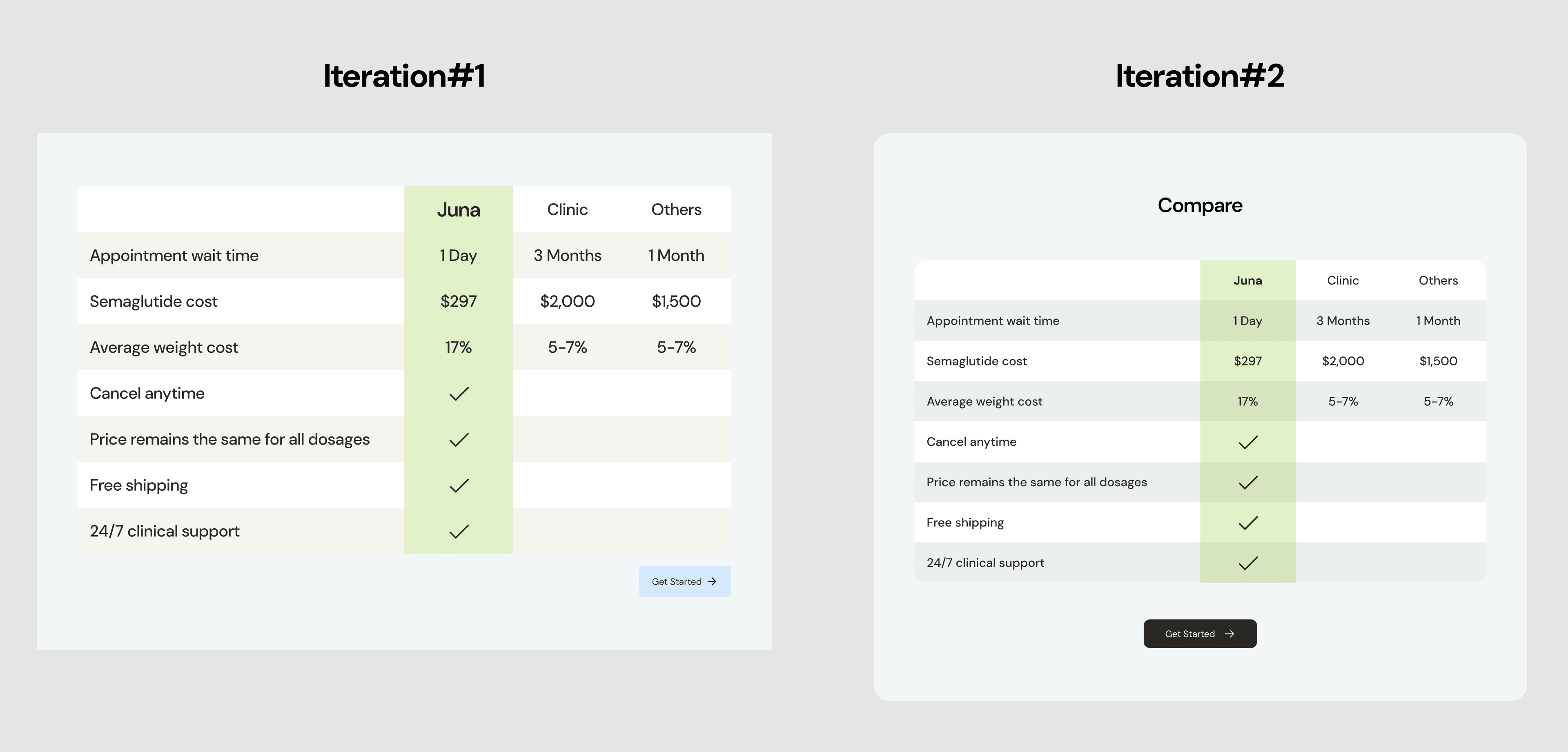
In the "Comparison" section, I used a card layout to maintain consistency with the overall design and a modern look. Key improvements included:
- Changing the CTA button color to the primary color for consistency.
- Adding rounded corners with varying radius for the inner table and outer card to avoid unnatural visual effects.
- Adjusting the table background color to align with the overall palette.
Comparison section design
Mobile responsive design
"How It Works" Section - Mobile
For the "How It Works" section, I made specific adjustments:
- On tablets, I rearranged the stack cards horizontally to better showcase the background image.
- On mobile, I separated the background image from the cards and presented it as a standalone illustration for clarity and improved visual impact.
"Comparison" Section - Mobile
For the "Comparison" section, the existing table design posed challenges on mobile devices. Keeping the desktop width made the table partially hidden, while directly shrinking it compromised legibility and aesthetics. To address this, I explored three options:
- #1: Wrap the left column text across multiple lines to fit all content on one screen.
- #2: Make the scroll bar always visible for clear navigation.
- #3: Partially reveal the next column to hint at additional content.
I recommended option #1 as it ensures users can view all details simultaneously, reducing interactions and minimizing the risk of mis-scrolling. This approach enhances usability while maintaining clarity and alignment across devices.
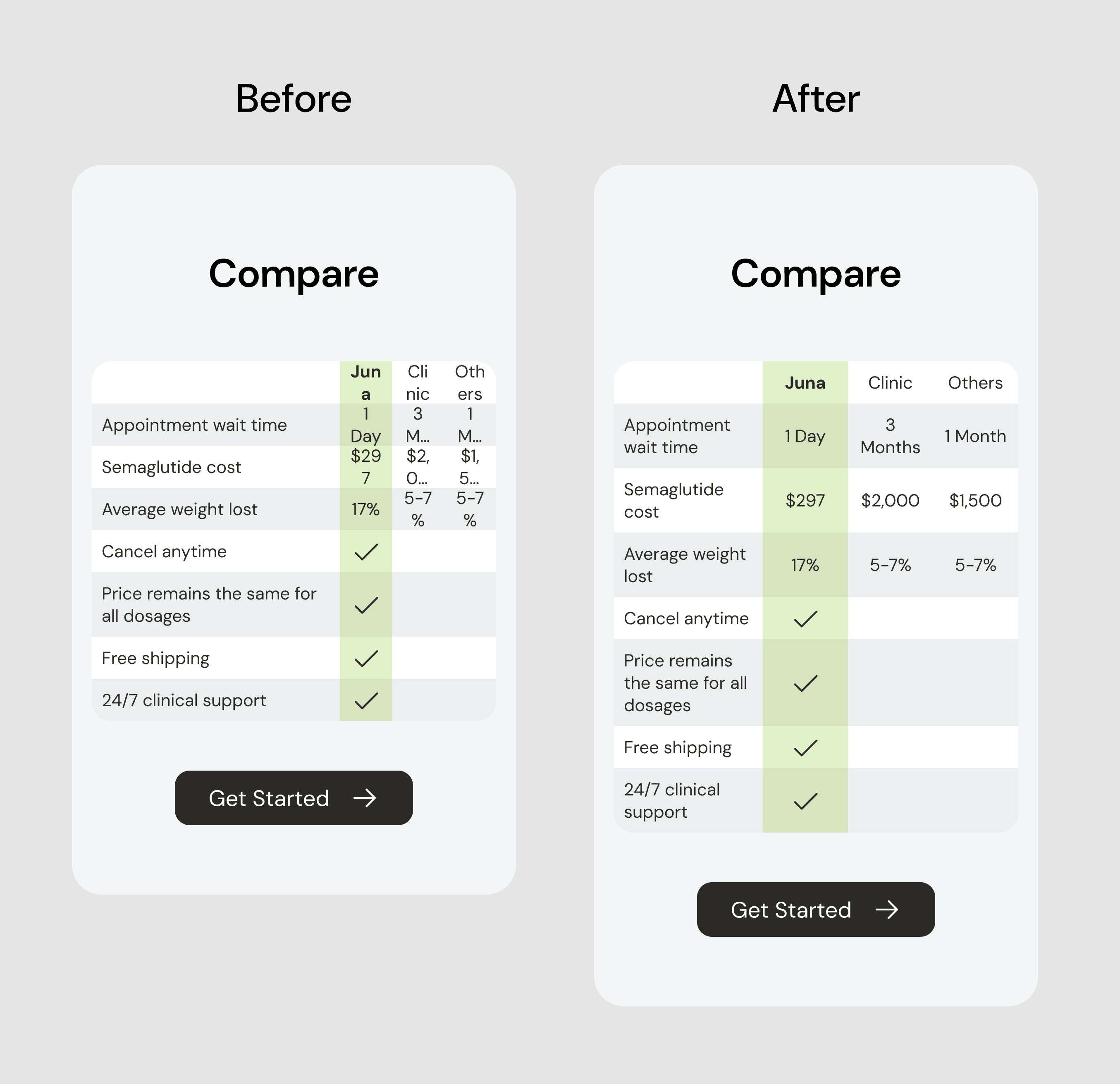
Mobile responsive comparison design
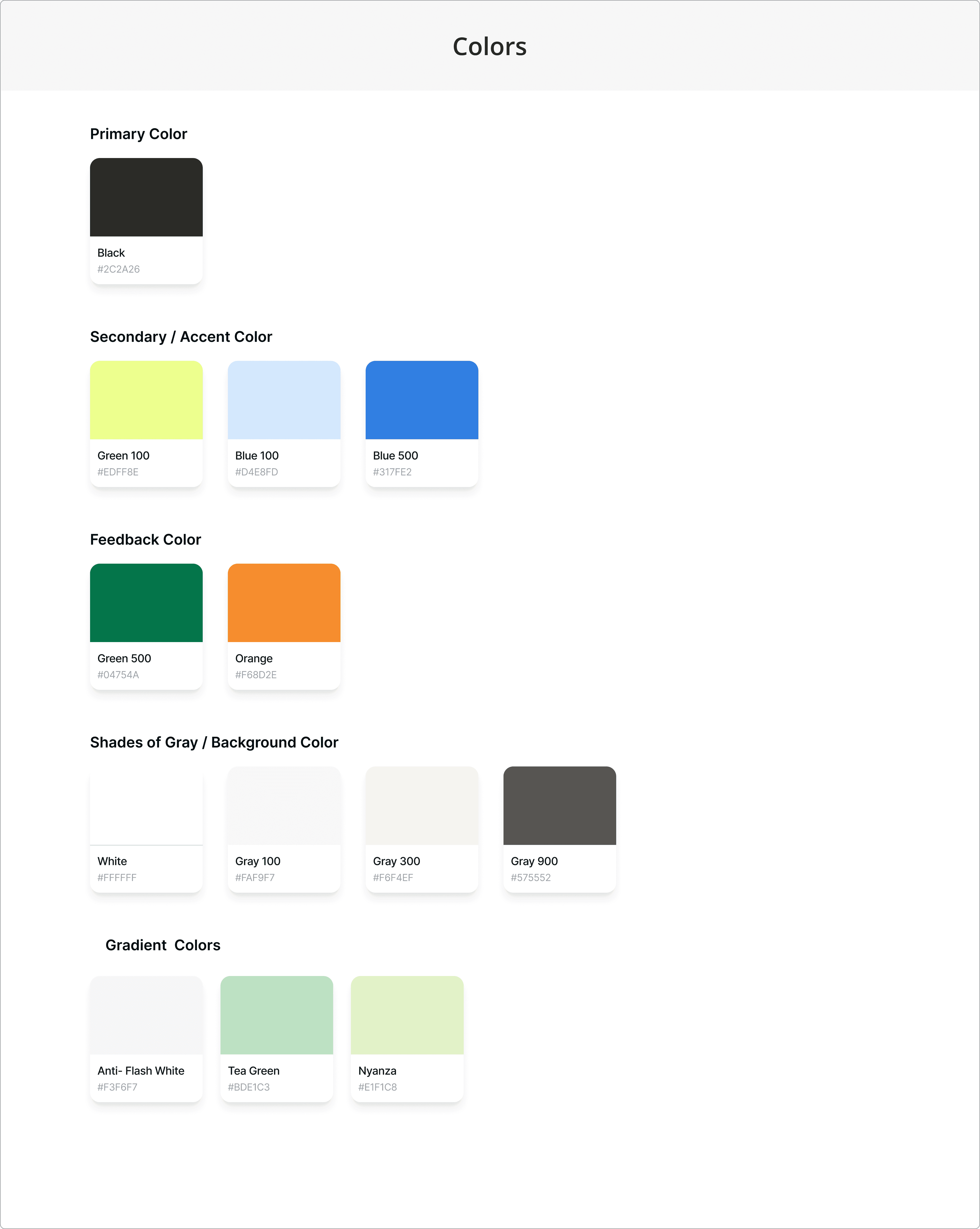
Style guide and branding
Style Guide
We developed a style guide to ensure consistency in color, typography, components, and icons. Charcoal Black was chosen as the primary color for a professional tone, while DM Sans offered a clean and readable typography. My role focused on creating the color system, where I analyzed the existing Juna website, identified all colors, and organized them into primary, secondary, and supporting palettes to align with the brand's tone.
Design Handoff
While designing for desktop, tablet, and mobile, I realized that high-fidelity designs and prototypes alone weren't sufficient. To address this, I added annotations to the Hi-Fi designs, emphasizing platform-specific differences, such as how stack cards slide in uniquely on tablets.
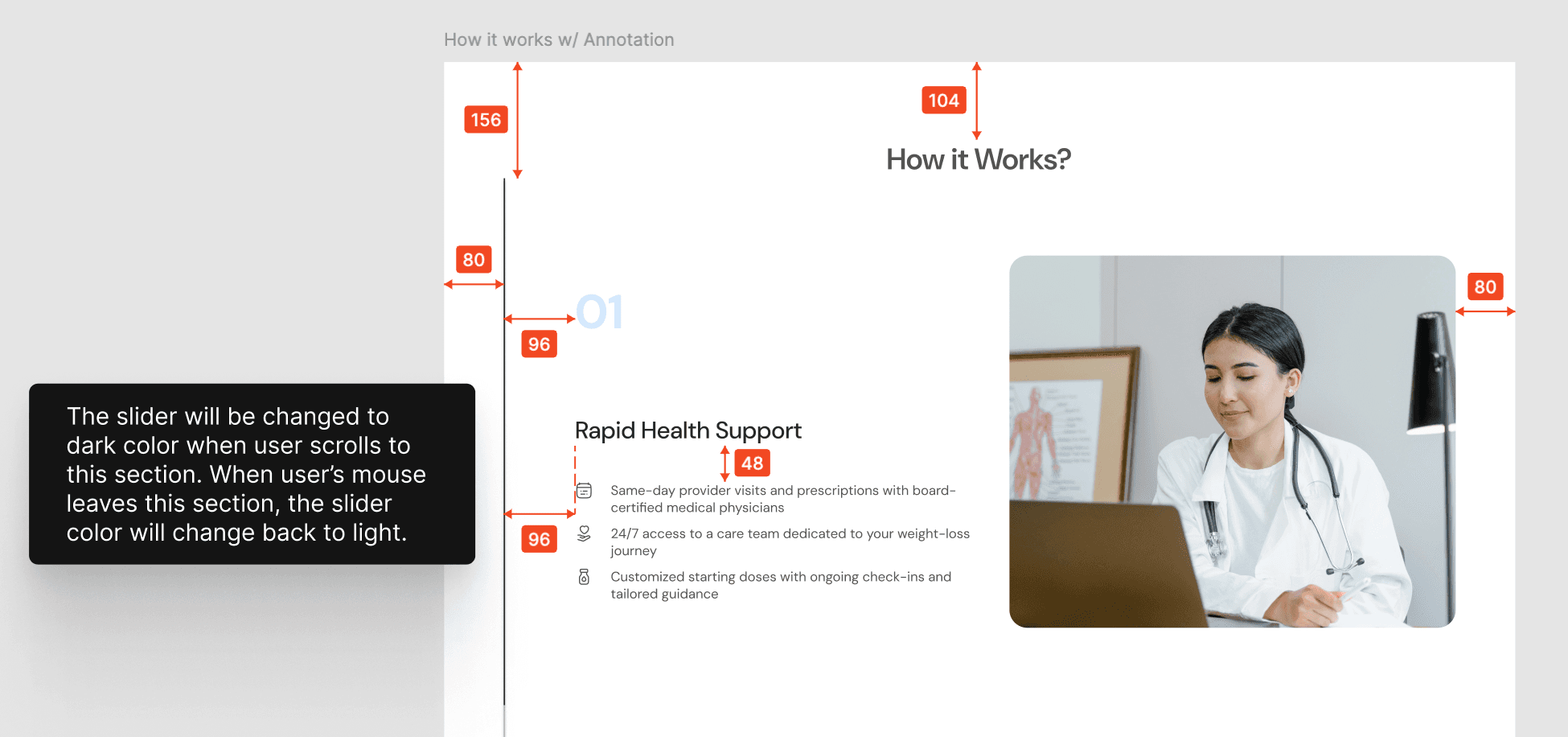
Design handoff and annotations
Prototype
To effectively demonstrate the new design and interactions with clients, I created a prototype. I explored solutions for animations like slide-ins through research and trial-and-error, ultimately finding an optimal approach.
Challenges
This project presented several challenges
- Selecting the right colors from similar shades to ensure visual harmony across the website. Subtle differences in shade can affect readability and brand perception.
- Working on a medical product outside my usual domain, requiring extensive exploration of industry trends and user behaviors.
New Skills
The challenges became opportunities for growth, allowing me to gain valuable new skills
- Conducted in-depth UX research, using heatmaps and clickmaps to analyze user behavior and identify pain points with data-driven insights.
- Strengthened the ability to tackle unfamiliar design challenges by exploring new industry trends and user needs.
- Leveraged technical expertise to bridge the gap between design and development, ensuring practical and effective solutions.